Windows 10 reached EOS (end of support) on October 14, 2025. If you are on Windows 10, see this article.

Sykje yn Support

Mij stipescams. Wy sille jo nea freegje in telefoannûmer te beljen, der in sms nei ta te stjoeren of persoanlike gegevens te dielen. Meld fertochte aktiviteit mei de opsje ‘Misbrûk melde’.

Mear ynfo

Dizze konversaasje is argivearre. Stel in nije fraach as jo help nedich hawwe.

Import Scenes from Mozilla Hubs to Hubs Personal Cloud

  • 1 antwurd
  • 1 hat dit probleem
  • 91 werjeftes
  • Lêste antwurd fan philipp.heisig
  • Argivearre

Hi!

Thanks for the awesome product. We plan to use Mozilla Hubs for an industrial fair and therefore I've setup a Personal Hubs Cloud instance via AWS. The deployment seems to work so far. However, I came up with some questions:

1. Is there a way to password protect the Hubs main page and if so what would be the best way to do it?

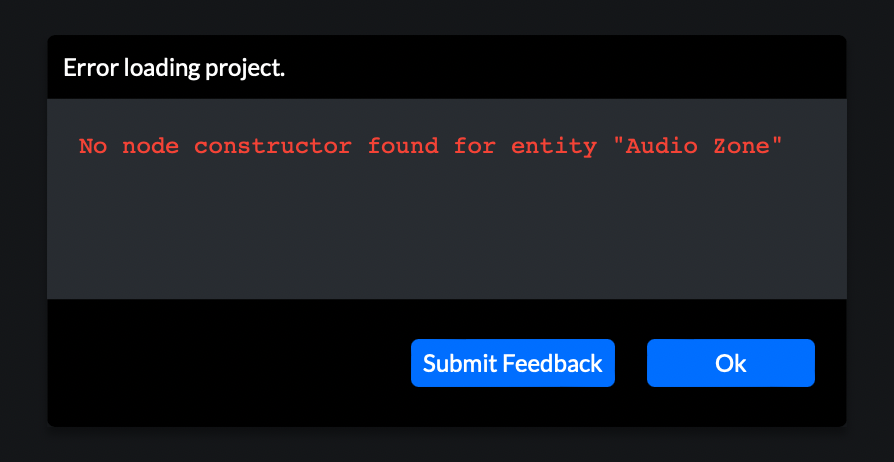
2. We've created some scenes via Spokes (https://hubs.mozilla.com/spoke) and now I'm wondering what is the best way to import them into our Hubs Cloud instance. The only way I've found it to publish the scene to Mozilla Hubs with the remix and promote option activated and then create a new project in Hubs Cloud and search for the scene. This leads, however, to some strange errors and the room isn't loading (see screenshots for the errors). I also tried to export the scene as .spoke file and import it in Hubs Cloud, but haven't found a way to do so.

Are there any solutions for these questions?

All the best Philipp

Hi! Thanks for the awesome product. We plan to use Mozilla Hubs for an industrial fair and therefore I've setup a Personal Hubs Cloud instance via AWS. The deployment seems to work so far. However, I came up with some questions: 1. Is there a way to password protect the Hubs main page and if so what would be the best way to do it? 2. We've created some scenes via Spokes (https://hubs.mozilla.com/spoke) and now I'm wondering what is the best way to import them into our Hubs Cloud instance. The only way I've found it to publish the scene to Mozilla Hubs with the ''remix'' and ''promote'' option activated and then create a new project in Hubs Cloud and search for the scene. This leads, however, to some strange errors and the room isn't loading (see screenshots for the errors). I also tried to export the scene as .spoke file and import it in Hubs Cloud, but haven't found a way to do so. Are there any solutions for these questions? All the best Philipp

Alle antwurden (1)

Only 1 screenshot is working for some reason