How Can I Tell if the Mozilla VPN is active in my Firefox browser?

How Can I Tell if the Mozilla VPN is active? Logically, an icon would be displayed near the top of the Firefox browser, but I don't see anything for it.
This question was asked on 8-21-20, but the only answer was 3 links that did not answer the question and that were not useful.
Can anyone answer "How Can I Tell if the Mozilla VPN is active in my Firefox browser?"
Please, no links unless it's to a direct answer to this question. If you don't know the answer, FCS don't leave a reply.
Thanks.
Keazen oplossing
Hey there,
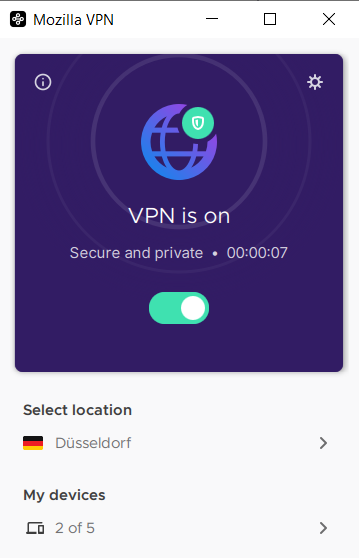
You can verify the VPN is active or not by opening the VPN app and checking the connection status,it's not going to reflect on your browser. When it shows you are connected (see attached image), all your internet traffic will get encrypted and routed through one of our secure servers. All your internet traffic will be protected regardless of the browser you are using.
Hope this helps.
Dit antwurd yn kontekst lêze 👍 0Alle antwurden (1)

Keazen oplossing
Hey there,
You can verify the VPN is active or not by opening the VPN app and checking the connection status,it's not going to reflect on your browser. When it shows you are connected (see attached image), all your internet traffic will get encrypted and routed through one of our secure servers. All your internet traffic will be protected regardless of the browser you are using.
Hope this helps.