


auto completion in some cases doesn't work

Hello :-)
Can you help me?
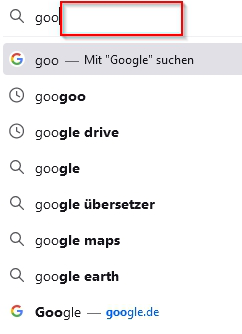
After I delete my timeline the auto completion in some cases doesn't work any mory. For example Google:
[See screenshot in attachment]
Before I delete the timeline Firefox always suggested "www.google.de"
How can I fix this?
Many thanks! Micha
Alle antwurden (3)
Hi micha.korb,
(1) In a new tab, type or paste about:config in the address bar and press Enter/Return. Click the button promising to be careful.
(2) In the search box above the list, type or paste URLB and pause while the list is filtered
(3) If the browser.urlbar.autoFill preference is bolded and "modified" or "user set" to false, double-click it to restore the default value of true
Any improvement?
Hi Micha, if the above suggestion does not solve the problem:
Did you change any settings related to history? Usually when you clear browsing history, Firefox will start recording history again and suggesting sites again soon, but if you blocked Firefox from storing new history, then that would not happen.
Thanks for your answers.
Unfortunately I don't understand this. :-/ about:config no problem. But then? :-o