


Windows 10 reached EOS (end of support) on October 14, 2025. If you are on Windows 10, see this article.

Sykje yn Support

Mij stipescams. Wy sille jo nea freegje in telefoannûmer te beljen, der in sms nei ta te stjoeren of persoanlike gegevens te dielen. Meld fertochte aktiviteit mei de opsje ‘Misbrûk melde’.

Mear ynfo
Dizze konversaasje is argivearre. Stel in nije fraach as jo help nedich hawwe.
Argivearre

Firefox 57 extra spacing on left of tabs when using titlebar

cor-el beäntwurde
472853

On macos when you go into customize mode and check "Title Bar" at the bottom it adds some spacing to the left side of the tabs bar to avoid the tabs overlapping with the mac titlebar buttons (close, minimize, maximize buttons).

However, I have used userChrome.css in order to move the tab bar to the bottom. At first the navigation buttons were overlapping with the titlebar buttons but that was easily fixed by just adding a "Flexible Space" element on the left. But no matter what I do I cannot get that spacing on the left of the tabs to go away unless I uncheck "Title Bar", but I would prefer to not have to do that.

On macos when you go into customize mode and check "Title Bar" at the bottom it adds some spacing to the left side of the tabs bar to avoid the tabs overlapping with the mac titlebar buttons (close, minimize, maximize buttons). However, I have used userChrome.css in order to move the tab bar to the bottom. At first the navigation buttons were overlapping with the titlebar buttons but that was easily fixed by just adding a "Flexible Space" element on the left. But no matter what I do I cannot get that spacing on the left of the tabs to go away unless I uncheck "Title Bar", but I would prefer to not have to do that.

Alle antwurden (2)

Sorry I guess the image didn't finish uploading when I submitted the question. Here is a screenshot.
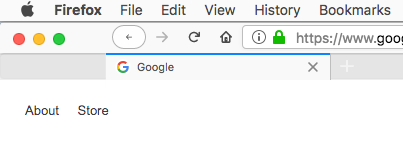
Did you make sure to remove the flexible space you put on the Tab bar?

What do you get if you right-click that area?

Does it include "Remove from Toolbar"?