


A website has a new screen to accommodate mobile users; I'm using a desktop. Now my icons don't look right, except in Internet Explorer.

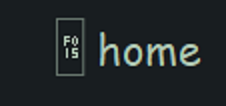
My icons now look like plain tabs in which two meaningless characters are on the top and two are on the bottom. They look like gibberish.
Solution choisie
Does this font work here?
Make sure that you allow pages to choose their own fonts.
- Tools > Options > Content : Fonts & Colors > Advanced: [X] "Allow pages to choose their own fonts, instead of my selections above"
Make sure that downloadble fonts is enabled, the gfx.downloadable_fonts.enabled pref should be true.
Lire cette réponse dans son contexte 👍 0Toutes les réponses (12)

Hello,
In order to better assist you with your issue please provide us with a screenshot. If you need help to create a screenshot, please see How do I create a screenshot of my problem?
Once you've done this, attach the saved screenshot file to your forum post by clicking the Browse... button below the Post your reply box. This will help us to visualize the problem.
Thank you!
I wanted to attach that to my original question but didn't see how to do it. Here it is:
Does disabling Adblock Plus work? Adblockers, or addons such as Ghostery, and TACO may render webpages to display incorrectly.
No, that doesn't help because I had already disabled it on that website.
Reload the webpage while bypassing the cache using one of the following steps:
- Hold down the Shift key and click the Reload button with a left click.
OR
- Press Ctrl + F5 or Ctrl + Shift + R (Windows and Linux)
- Press Command + Shift + R (Mac)
Does this help?
If not can you provide a website URL.
Neither method helped. The website is abovetopsecret.com .
Solution choisie
Does this font work here?
Make sure that you allow pages to choose their own fonts.
- Tools > Options > Content : Fonts & Colors > Advanced: [X] "Allow pages to choose their own fonts, instead of my selections above"
Make sure that downloadble fonts is enabled, the gfx.downloadable_fonts.enabled pref should be true.
I don't understand the reference to fonts when my problem is icons.
Did you try it?
Those icons are actually a user defined downloadable font as you can see by the squares with the hex code and not images, so you need to check for font issues.
Modifié le par cor-el
Yes and it worked. Thanks.
Thank you very much. Very helpful.