


TB freezes on startup. I need help fixing TB. SOLVED by "Repair" of Inbox.

Today TB froze during start up. No problems yesterday.
I deleted global-messages-db.sqlite and restarted TB. Now it is frozen with a "Loading messages". Maybe it is rebuilding indexes and this takes a long time and I should be patient.
Maybe my In and Sent mail boxes are too big? If so, how can I safely prune them?
TB is becoming increasingly unstable for me. It was very reliable before about a month ago.
I doubt my AV is the culprit because AV has not changed today.
Thank you one and all.
Modifié le par Wayne Mery
Solution choisie
Problem is solved, but it's ugly. Apparently the INBOX table was damaged and rejected new, in-bound emails before filtration.
To fix the problem, I ran Properties -> Repair Folder on the In box. This repaired the mail box by deleting 99% (rough approximation) of the messages in the mail box. Now new messages download and write to Thunderbird mail boxes, but I lost most of my old messages, the ones in the In box.
I have a lot of other mail boxes and I set up dozens of filters. This means a lot of email messages, the ones that got filtered, are still there. But the ones sitting in the general In box are gone.
I make backups. I found my most recent back up and dug down to find the INBOX file. I restored it to an empty folder. I renamed it and its associated MSF file to INBOX1. Then I copied to the my TB mail folder. This worked. I can see 99% of my lost emails in the restored INBOX1 folder within the Thunderbird user interface.
Not the best solution, but I am back up and running with nearly all of my data restored.
I consider myself a Windows and database "power user". If I were an unsupported end-user, there's no way I could have done this sort of repair.
Thank you for your help.
Toutes les réponses (12)
Please step through https://wiki.mozilla.org/Thunderbird:Testing:Memory_Usage_Problems and let us know what you find.
Here is what you ask:
Thunderbird freezes on startup. I suspect mail box index trouble. This happened before about a month ago.
Today, this morning, I deleted the global index file global-messages-db.sqlite and re-launched TB. TB freezes. Maybe it is re-building the index and maybe it is frozen. I do not know. I let it run for three hours before killing the TB session. I have a lot of messages, but three hours seems like plenty of time to re-index. Should I let it run overnight?
After three hours, I looked at the file in my Profile folder. The file exists but is quite small, 1 megabyte. Earlier versions of the file are 1/2 a gigabyte.
Here are the steps from the Wikipedia page and my responses:
1: Version: I run newish TB: 153.3 on Win10 2: I launched TB in Troubleshoot mode. No improvement. 3: I did not start my computer in Safe mode. 4: TB is excluded in the AV. TB ran fine yesterday, but freezes today. 5: I do not use GMAIL. 6: I cannot get to “Is "Unified Folders" enabled in "Folder Modes" because TB does not get past the start up. It freezes. 7: I want to try this … “Folders should be well maintained. Help > Troubleshooting Information lists large folders. Folders may also be broken, which can be fixed with right+click on folder, Properties > Repair. Signs of problems and common maintenance steps:” But I cannot. TB is frozen on start up. 8: No remote calendars. 9: No proxy. 10, 11 and 12: I cannot get into TB to look at these ideas. 13: I would like to try this … “Does problem resolve by disabling Global Search indexing? Tools|Options|Advanced|General| uncheck Enable Global Search and Indexer” … but I cannot run TB. 14: Same as above. 15: CPU usage is low when TB is trying to run. If it is rebuilding indexes, it is not using much computer power. 16: No Newsgroups. 17: All of my Thunderbird is on a local disk. 18: I have a good SSID disk. Again, TB ran well yesterday. Today, it does not start. 19: I do not think my email provider is re-sending emails. 20: My PC is powerful and it is not a VM. 21: For these, some are not possible because TB freezes on start up. • Does turning off the Status Bar in View > Toolbars help improve performance? • If your folder or account has many (tens of thousands of messages), consider the possibility that your mail provider is throttling (limiting) traffic to its servers. This can make checking for or getting new messages to be slower than expected. Not happening. • Is filter logging enabled at Tools > Filters? (look for filterlog.html files - large logs cause high overhead) I cannot find file filterlog.html in the Profile folder or below. • Do you use server side message filters to place messages in folders? bug 589310 No. Filtering occurs in TB. • If you have ever had RSS feed reader accounts: o Is "Automatically create tags from feed category names" enabled? Then there is a good chance the prefs.js contains many tags which are causing a performance problem [19] o In Account Settings > Server Settings disable "Check for new messages at startup". If problem is gone you may be seeing bug 551144 (fixed in version 13). No RSS feed, • Is prefs.js file in the Thunderbird profile directory larger then 500 KB? If yes, then it might have excessive tag entries from the RSS issue discussed above, or some unexpected, repetitive entries. No. It is small:
• Does it help to clear cache at Settings > General > Disk Space > "Clear Now" and Help > Troubleshooting Information > "Clear startup cache..."? • Do you have thousands of contacts in your address book? No. • On Linux? A package might be causing the problem [20]. Are you running an old version? Consider updating. hangs on Ubuntu 10.04, 14.04 works No. Win10. • On macOS, try disabling Thunderbird's access to Mac Contacts in Mac System Settings > Privacy & Security > Contacts. Not on Mac. • On Windows, did you move the Thunderbird profile directory or any Thunderbird account from the default location "%APPDATA%"? If yes, then MS-Windows Search will attempt to index all Thunderbird disk activity. Disable Windows indexing for your Thunderbird data. No. • Uninstall Thunderbird, then DELETE the Thunderbird PROGRAM directory (not the data directory), then download, reinstall, and retest Thunderbird. If using beta get it from channels. • If Thunderbird memory usage is more than 1.5GB or more then folders may be corrupted or are not being closed. Please get a diagnostic log of Thunderbird activity with MSGDB:5,timestamp using logging instructions, then file a bug, and attach the zipped log file using "Add an attachment".
> Uninstall Thunderbird, then DELETE the Thunderbird PROGRAM directory (not the data directory), then download, reinstall, and retest Thunderbird. If using beta get it from channels.
Actually you don't have to uninstall. Just delete the program directory and install from https://www.thunderbird.net/en-US/download/esr. You should be on 153.4.0, which in fact does fix one type of startup hang.
I will try that. Thank you for jumping in.
-Matt.
No good.
I renamed the old C:\Program Files\Mozilla Thunderbird folder (so as to disable it without deleting it entirely) and then installed the latest Thunderbird (Thunderbird Setup 153.4.0esr.exe). It installed without trouble.
I launched TB and I get the same result. TB hangs on the "Loading message..." status message in the lower left corner.
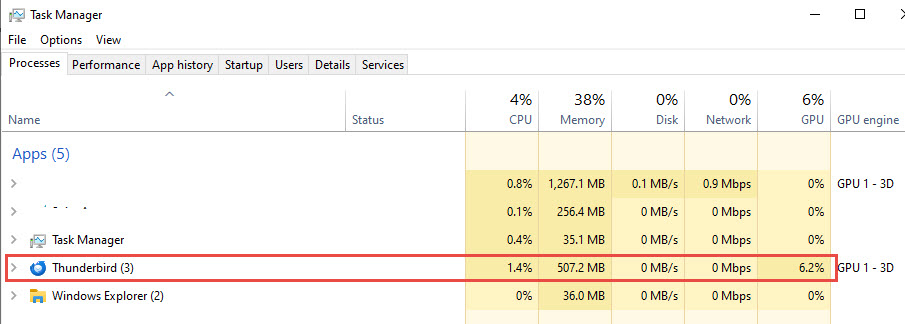
TB is running. Task Manager shows it is active.
Considering erasing all of the MSF files as described here. Good idea? https://www.datarecovery.institute/reindex-thunderbird-folders-messages-database/
deleting or not deleting MSF file is really simple. It stores nothing that you will not recover from (usually message labels and some items on the odd IMAP server that does not support the full IMAP suit of commands.) I have done it many times. On large folders it can see signioficant increases in the time to open the folder contents post delete while the local store, or sometimes the IMAP server, is interogated to rebuild the index.
While you say your antivirus is excluded (and mine should be but periodical Microsoft appear to clear some setting with update to defender) that does not prevent other interactions. Antivirus interferes with getting messages (incoming mail scanning and encrypted communications monitoring) VPN's can see mail server play games or simply demand you re-authenticate. This is common with most of the so called free providers. and then we have the monitoring of the system temp folder. Again a default antivirus caper, often the temp folder is a bottleneck slowing the entire system I suggest you clear it using the tools windows provides. For Windows 10 that is usually https://support.microsoft.com/en-us/windows/experience/storage-filemanagement/free-up-drive-space-in-windows
Windows is rather unique as an operating system in that it makes no effort to conrol the content of this folder, nor to remove orphaned files. Cleaning the birdcage or automated garbage collection have been computing terms for as long as I have been involved with them. Micirisift are still struggling with the concept apparently.
There has been talk for decades about windows slowing down after a few months. Temp folder bloat is a significant contributing factor and needs manual intervention regularly to control it. It makes all of your system run faster and often removes momentary hitches while the operating system walks the memory heap that contains the hundreds of thousands of temp file entries in a folder that should have perhaps 100.
Hello,
There is no VPN here. TB runs locally on my C: drive.
My C: drive has lots of free space and the various temp and garbage folders are nearly empty. The Windows Disk Cleanup utility says I can free up a scant 8 GB if I run it.
If I turn off my AV, the Thunderbird freeze-on-startup problem persists. I remain convinced this is a problem with the Thunderbird database trying to read my mailboxes and failing on one of them.
My mail comes in via a POP server, not IMAP.
I will delete my MSFs. I need my email client back and I have run out of other ideas.
-Matt.
Still no success. I deleted ALL MSFs.
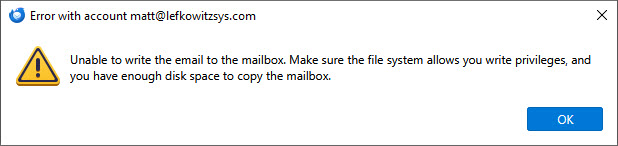
Now TB does not hang on start up. But it fails to write the in-bound emails because of the attached pop up.
I have plenty of disk space. The user privileges on the TB "Mail" folder are as they were before this trouble started.
I tried to run TB as a Windows Admin. Same failure.
Any new ideas?
Solution choisie
Problem is solved, but it's ugly. Apparently the INBOX table was damaged and rejected new, in-bound emails before filtration.
To fix the problem, I ran Properties -> Repair Folder on the In box. This repaired the mail box by deleting 99% (rough approximation) of the messages in the mail box. Now new messages download and write to Thunderbird mail boxes, but I lost most of my old messages, the ones in the In box.
I have a lot of other mail boxes and I set up dozens of filters. This means a lot of email messages, the ones that got filtered, are still there. But the ones sitting in the general In box are gone.
I make backups. I found my most recent back up and dug down to find the INBOX file. I restored it to an empty folder. I renamed it and its associated MSF file to INBOX1. Then I copied to the my TB mail folder. This worked. I can see 99% of my lost emails in the restored INBOX1 folder within the Thunderbird user interface.
Not the best solution, but I am back up and running with nearly all of my data restored.
I consider myself a Windows and database "power user". If I were an unsupported end-user, there's no way I could have done this sort of repair.
Thank you for your help.
I have to correct you. Repair only scans the store and builds a new index that is used to display the list of email. It deletes nothing. In the case of IMAP it initiates a fresh download from the server, but again it deletes nothing.
So the index is fixed, but if you have not compacted your old messages are probably in your folder still but the file that holds them has been corrupted somehow. As messages are stored in a text file (MBOX-RD format) the file can be examined in a text editor and often repaired by removing the corrupt portion but that is a somewhat different discussion.
Note I suggest an editor like Notepad++ not windows notepad to view MBOX files. Notepad struggles with the size of the files
The next point is never restore an MSF file, they on occasions store information about labels etc but can generally be considered as not required and not worth backing up. If they are missing from the profile folder opening the folder in Thunderbird will regenerate them on demand. That is what the repair regenerated from reading the inbox file and you erroneously describe as deleting things.
If you think yourself a database power user, think of the MBOX file (the mail store) as a DBX file and the MSF as an NDX Thunderbird's storage is about as old as dBase so the analogy is closer that I would prefer
Thanks for posting your solution.
Something erased most of my Inbox file. It went from 2.2GB before this began to barely a few kilobytes after. I am convinced the table was damaged and that is the reason TB refused to receive new emails. The Inbox is the port of entry and it was not accepting new emails which explains why TB froze when trying to open the Inbox and receive in-bound emails.
You are a mind-reader. I am an old dBase user and programmer. dBase II was my first language after using Fortran and Pascal in college. Later Foxbase and then FoxPro which I still use professionally. Yes, indexes contain no data, only "meta" data, i.e. data about the rows and columns in the data table. Deleting and recreating indexes does not destroy data.
But something destroyed most of the contents of my Inbox and prevented the Inbox from receiving new emails. I think corruption, as you suggest, is most likely.
Dropping my two day old back up Inbox file into my TB (POP) mail folder gets me most of my lost emails back, albeit in an archive file rather than in my primary Inbox where they used to live. This is less than ideal but gets me back on my feet. I suppose I could use TB to move emails from the archive In box to the live In box. I am a bit nervous about that after my bad weekend.
-Matt the old dBase programmer.