


firefox not responding frequently

Firefox constantly not responding/crashing
Toutes les réponses (6)

OK. Have you checked the Task manager in Windows that shows the CPU and Memory usage to see if there is any concern there.
How long has this been happening, what version of Fx and have you updated recently ??
no problems with memory and CPU. Downloaded Firefox recently. Crashes a lot.
We're sorry to hear that Firefox is crashing. In order to assist you better, please follow the steps below to provide us crash IDs to help us learn more about your crash.
The crash report is several pages of data. We need the report numbers to see the whole report.
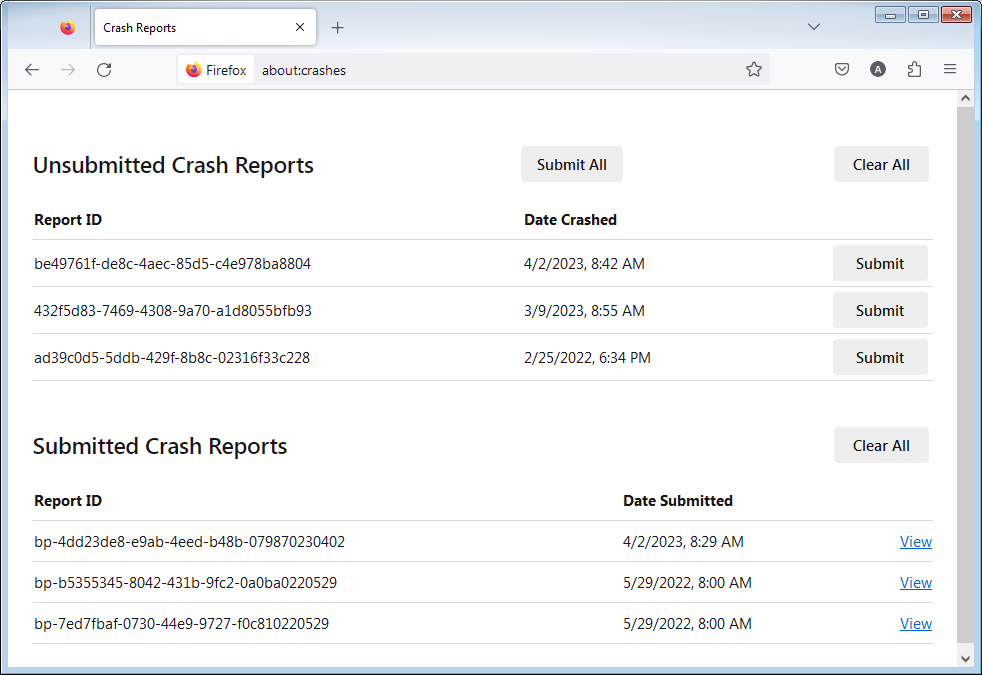
- Enter about:crashes in the Firefox address bar and press Enter. A list of Submitted (and Unsubmitted, if any) Crash Reports will appear, similar to the one shown below.
- Copy the 5 most recent Submitted Report IDs that start with bp- and then go back to your forum question and paste those IDs into the "Post a Reply" box.
Note: If a recent Report ID does not start with bp- click on it to submit the report.
(Please don't take a screenshot of your crashes, just copy and paste the IDs. The below image is just an example of what your Firefox screen should look like.)
Thank you for your help!
More information and further troubleshooting steps can be found in the Troubleshoot Firefox crashes (closing or quitting unexpectedly) article.
bp-84839e3c-c9ff-4158-815b-db2390260809 8/9/2026, 2:17 PM View bp-df32d53b-ab2d-4edc-bc95-edc240260809 8/9/2026, 2:18 PM View bp-c1ce81e6-247a-4efa-af75-6283d0260809 8/9/2026, 2:18 PM View bp-0f50af2a-1d60-46e9-9c30-83d330260809 8/9/2026, 2:21 PM View bp-631383ef-22f0-4e32-a437-abf810260809bp-84839e3c-c9ff-4158-815b-db2390260809 8/9/2026, 2:17 PM View bp-df32d53b-ab2d-4edc-bc95-edc240260809 8/9/2026, 2:18 PM View bp-c1ce81e6-247a-4efa-af75-6283d0260809 8/9/2026, 2:18 PM View bp-0f50af2a-1d60-46e9-9c30-83d330260809 8/9/2026, 2:21 PM View bp-631383ef-22f0-4e32-a437-abf810260809v
What are you doing during these crashes? Is that some game, or rendering engine in general, or some drawing/CAD–like app? And/or resizing the browser window or dragging things around?
These are pretty wild and all over the place. Could you please try downloading a separate Firefox Nightly nightly.mozilla.org that will come with its own clean profile, and run that for a bit, to see if you get the same crashes in there? Thanks.
In addition to the above, can you try running your release Firefox in Troubleshoot Mode and see if it keeps crashing?