


Firefox settings (with Debian and WSL)

I'm using a Windows/Linux client called WSL (Windows Subsystem for Linux). I've installed Debian as my WSL OS and for a long time I had Debian version 10. Firefox worked fine with ver 10 but this morning I upgraded to Debian version 13 (which required me to upgrade to the latest version of Firefox).
Firefox still launches okay but I wanted to change my home page to Google. So I clicked the 3 lines at the top RHS which showed me a popup menu but none of the options was selectable. Eventually I twigged that to change settings I needed to launch Firefox using sudo.
I managed to change the home page okay but I then realised that if I launch Firefox without using sudo, my new home page is ignored. Conversely (if I launch using sudo again) Firefox launches at a tiny size and can't be re-sized (at least, not using my mouse cursor). I've attached a small screenshot.
All I can do is to display it full screen and then I can tell that the home page is indeed now Google. I don't remember having these problems previously so can anyone give me a clue as to what I'm doing wrong??
Toutes les réponses (6)
Something's not right here because I can't attach images now for some reason :-(
[Edit...] After a re-boot I can now resize the tiny version that got launched with sudo. But without using sudo I still don't see Google as my home page. Is that just the way it is these days?
[Edit 2...] Groan... yes I can resize when using sudo but if I close Firefox and relaunch it, the new size doesn't get remembered :-(
Any help gratefully received!
Modifié le par johne53
This sounds like the profile folders either moved, or the user running the instance doesn't have a permission, or has a different profile path etc.
While I'll defer to Debian or WSL experts here, the profile folder and its permissions is something to look into for now.
Thanks @jbr. One other strange thing is that when I launch Firefox using sudo the 'Home' icon is at the top LHS but when I launch it without using sudo it's at the top RHS?!? I'm totally baffled :-(
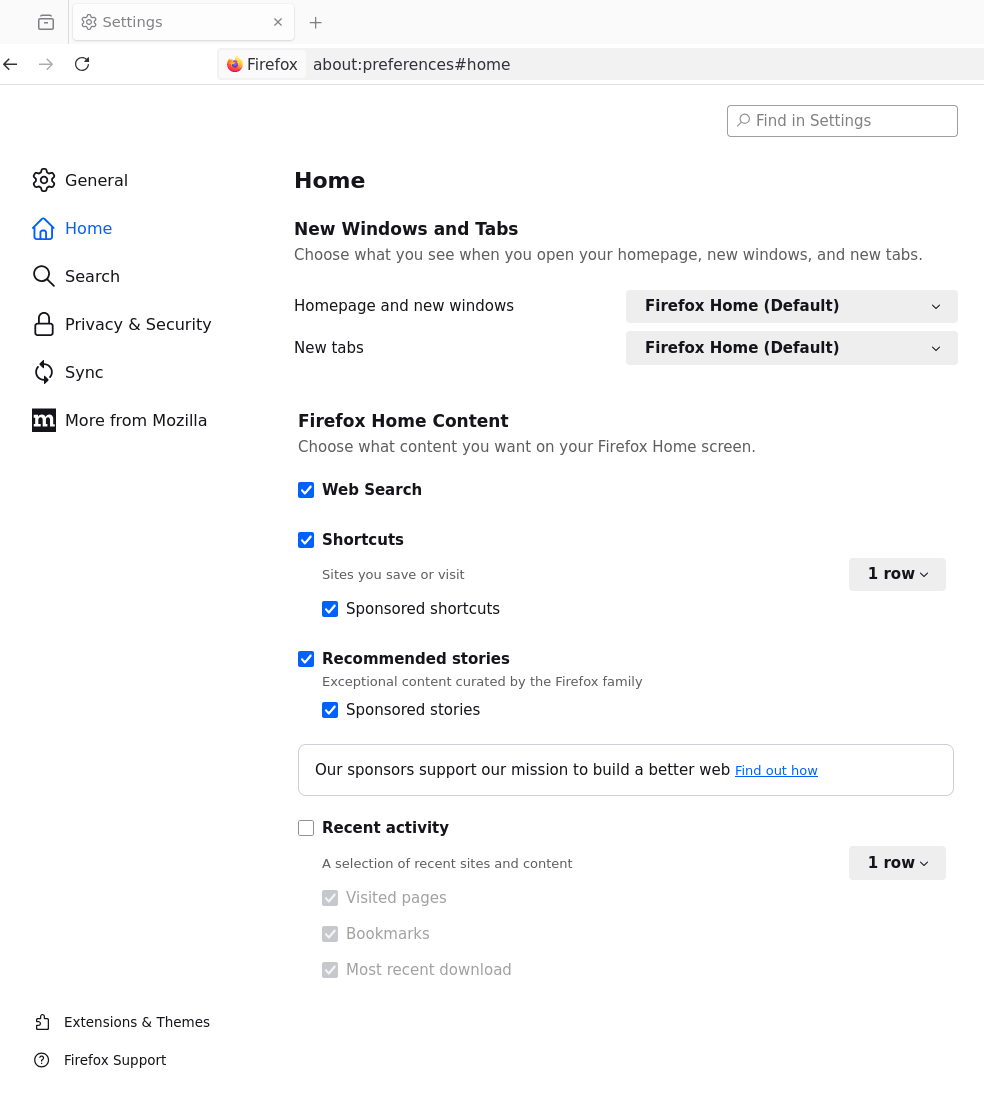
I'm not sure if this'll work but it's the only way I can find to show an image (it should be the image I see in Settings):-
Modifié le par johne53
If someone can explain how to add images to a post I'll post a screenshot of what I'm seeing here (I can browse for an image and select it but I can't find any way of then adding it to a reply).
[Edit...] This is weird. My post with the image attached suddenly appeared a couple of hours later. Is there maybe some authentication process needed? Anyway, what I wanted to say was that in the above image, all the settings shown can be edited (without using sudo) except for the two labelled Firefox Home (Default) and the two smaller dropdown list boxes. So is it correct that list boxes can only be changed if running via sudo?
Modifié le par johne53
You don't need / should not run Firefox with sudo permissions — it points at something off at the system level.
(The image post might have gotten into moderation for containing an unknown link at the time.)
If you're having issues accessing the dropdown components, it's maybe a broader issue with the OS integration or the compositor used — seems you can't actually activate these comboboxes. (Do your comparable GUI applications work with similar components?)
As for profile location, you'll see those in about:profiles or about:support to check you're seeing the same profile launched sudo or not, and can verify if the access bits on that location match what user the Firefox process is running as.