


Windows 10 reached EOS (end of support) on October 14, 2025. If you are on Windows 10, see this article.

Rechercher dans l’assistance

Évitez les escroqueries à l’assistance. Nous ne vous demanderons jamais d’appeler ou d’envoyer un SMS à un numéro de téléphone ou de partager des informations personnelles. Veuillez signaler toute activité suspecte en utilisant l’option « Signaler un abus ».

En savoir plus
Ouvert

How do I refuse the VPN?

Agent virtuel a répondu
TASchmearer

I have automatic updates and my browser recently updated and there is VPN link on my browser wanting me to use it, but it doesn't give me the option to say no. I already have a VPN that I use through MalwareBytes that I use and another that I'm not using through Protonmail. For some reason since the VPN link showed up on my browser I have websites that I use every day that won't load. I want to refuse the VPN and see if that helps, but my only option is a Get Started link. How do I get rid of that?
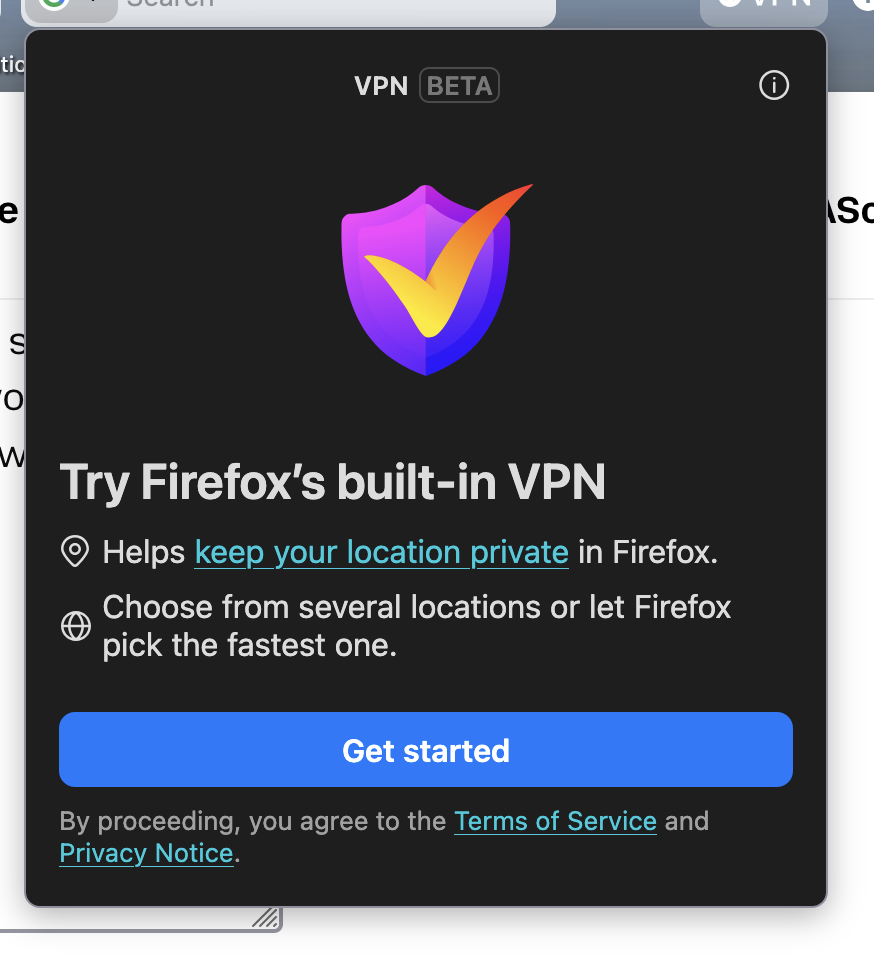
I have automatic updates and my browser recently updated and there is VPN link on my browser wanting me to use it, but it doesn't give me the option to say no. I already have a VPN that I use through MalwareBytes that I use and another that I'm not using through Protonmail. For some reason since the VPN link showed up on my browser I have websites that I use every day that won't load. I want to refuse the VPN and see if that helps, but my only option is a Get Started link. How do I get rid of that?
Captures d’écran jointes

Toutes les réponses (1)

Hello

Use built-in VPN in Firefox https://support.mozilla.org/en-US/kb/built-in-vpn

For information https://support.mozilla.org/en-US/questions/1576925#answer-1812490

You can try, the preference, browser.ipProtection.enabled, value, false

1 - Go to configuration editor https://support.mozilla.org/en-US/kb/about-config-editor-firefox 2 - Enter a search term browser.ipProtection.enabled You can double-click on the preference to set the value to false

Poser une question

Vous devez vous identifier avec votre compte pour répondre aux messages. Veuillez poser une nouvelle question, si vous n’avez pas encore de compte.