


Windows 10 reached EOS (end of support) on October 14, 2025. If you are on Windows 10, see this article.

Rechercher dans l’assistance

Évitez les escroqueries à l’assistance. Nous ne vous demanderons jamais d’appeler ou d’envoyer un SMS à un numéro de téléphone ou de partager des informations personnelles. Veuillez signaler toute activité suspecte en utilisant l’option « Signaler un abus ».

En savoir plus

Cloudlare Validation error on Attempted Login

  • Aucune réponse
  • 0 a ce problème
  • Ouvert

I have logged into TinyURL.com MANY times using Firefox. Now, I get a Cloudflare Validation Error when trying to do so (see attached screenshot/snip).

This was done in Troubleshooting mode, but is the same in standard mode, though I have no extensions enabled. I've tried turning Protection Tracking off; no luck. - We use ZoneAlarm, but the Web Secure functions are all disabled. - I have the same issue on 2 PC's, one Windows 10 and the other Windows 11, 64-bit. - I'm on FF release 150.0.2 - 64-bit, and both Windows installs are fully updated and kept that way. - I've reached out to TinyURL in hopes of resolving the issue. They suggested many of the above steps but not resolved this issue. - HOWEVER, I've found that login via Google Chrome IS seamless - no issues.

What is it with Firefox that it's having issues with the Cloudflare "Human" check? I've checked the Cloudflare site; all conditions are good, and this very setup passed the "Turnstile" check.

FF is my #1 preferred browser, so please look into this. I see that others have posted similar issues over multiple years here (but a search of support articles didn't find one . . .)

Thanks,
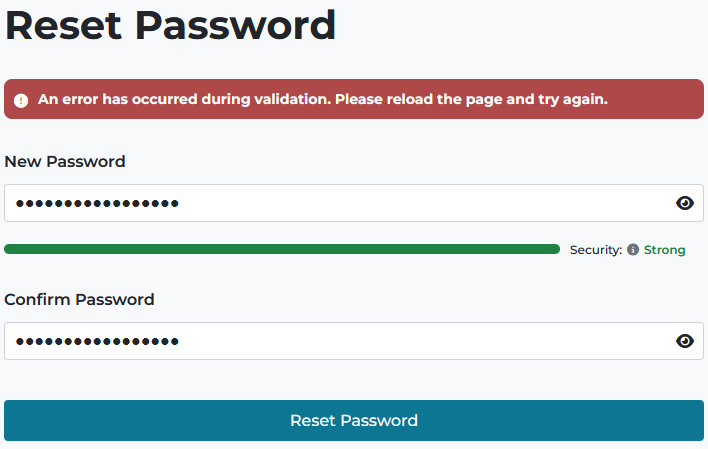
I have logged into TinyURL.com MANY times using Firefox. Now, I get a Cloudflare Validation Error when trying to do so (see attached screenshot/snip). This was done in Troubleshooting mode, but is the same in standard mode, though I have no extensions enabled. I've tried turning Protection Tracking off; no luck. - We use ZoneAlarm, but the Web Secure functions are all disabled. - I have the same issue on 2 PC's, one Windows 10 and the other Windows 11, 64-bit. - I'm on FF release 150.0.2 - 64-bit, and both Windows installs are fully updated and kept that way. - I've reached out to TinyURL in hopes of resolving the issue. They suggested many of the above steps but not resolved this issue. - HOWEVER, I've found that login via Google Chrome IS seamless - no issues. What is it with Firefox that it's having issues with the Cloudflare "Human" check? I've checked the Cloudflare site; all conditions are good, and this very setup passed the "Turnstile" check. FF is my #1 preferred browser, so please look into this. I see that others have posted similar issues over multiple years here (but a search of support articles didn't find one . . .) Thanks,
Captures d’écran jointes

Vous devez vous identifier avec votre compte pour répondre aux messages. Veuillez poser une nouvelle question, si vous n’avez pas encore de compte.