


Join us to show up for other Firefox users 🦊. Earn fun badges and Mozilla swag vouchers! Find out more: https://mzl.la/askafox150

Windows 10 reached EOS (end of support) on October 14, 2025. If you are on Windows 10, see this article.

Rechercher dans l’assistance

Évitez les escroqueries à l’assistance. Nous ne vous demanderons jamais d’appeler ou d’envoyer un SMS à un numéro de téléphone ou de partager des informations personnelles. Veuillez signaler toute activité suspecte en utilisant l’option « Signaler un abus ».

En savoir plus

right click print

  • 2 réponses
  • 0 a ce problème
  • 263 vues
  • Dernière réponse par bbezenek
  • Résolu

I like Firefox with one exception. The right-click print feature is missing in the drop-down menu. I can print from the Application Menu but the 'print' feature is missing using the mouse right-click menu. The right-click feature does work using other browsers. A picture of my right-click menu using Firefox is attached. THANKS
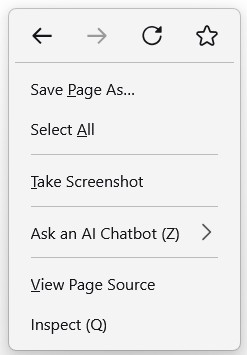
I like Firefox with one exception. The right-click print feature is missing in the drop-down menu. I can print from the Application Menu but the 'print' feature is missing using the mouse right-click menu. The right-click feature does work using other browsers. A picture of my right-click menu using Firefox is attached. THANKS
Captures d’écran jointes

Solution choisie

Hi,

Unfortunately, we don't have an option to add a print menu there.

However, you can simply press the Control (Ctrl) key on your keyboard and the P key at the same time and it will open the print tool.

Alternatively, you can add the print action to the toolbar using the instructions here: http://mzl.la/1BAQIvu

Thanks for getting in touch, Isaac

Lire cette réponse dans son contexte 👍 0

Toutes les réponses (2)

Solution choisie

Hi,

Unfortunately, we don't have an option to add a print menu there.

However, you can simply press the Control (Ctrl) key on your keyboard and the P key at the same time and it will open the print tool.

Alternatively, you can add the print action to the toolbar using the instructions here: http://mzl.la/1BAQIvu

Thanks for getting in touch, Isaac

Thank you - Big help. My solution was to just add the print option to the action toolbar at the top of the page. Works fine and easy to do. Simply:

1. Click on the 'Application Menu with the 3-horizontal bars on the top right of the page to open. 2. Click on 'More Tools' 3. Click on 'Customize Toolbar' 4. From the many action icons to choose from, grab the 'Printer' icon and carry it up to the toolbar and let it go.

WALLA - you have a quick and easy click to print solution.

Poser une question

Vous devez vous identifier avec votre compte pour répondre aux messages. Veuillez poser une nouvelle question, si vous n’avez pas encore de compte.