why does my settings not have a restore previous session option

I have no restore previous session option in settings
Toutes les réponses (2)

Show the issue please? Where did you get Firefox from? Are you running any security software besides MS Defender? Windows home or pro? If Windows Pro version, try testing in Windows Sandbox (VM) to see if you have the same issue. https://www.howtogeek.com/399290/how-to-use-windows-10s-new-sandbox-to-safely-test-apps/
If you need to restore a missing set of tabs right now:
Check for the manual restoration option. Either:
- "3-bar" menu button > History > Restore Previous Session
- (menu bar or Alt+S) History > Restore Previous Session
If they are missing or grayed, check either:
- "3-bar" menu button > History > Recently Closed Windows
- (menu bar or Alt+S) History > Recently Closed Windows
If none of the closed windows have what you need, use Firefox View, "Open Tabs" panel, to check for open windows that for whatever reason are not visible on your current desktop. See: Firefox View - Access pages from open tabs, recently closed tabs, tabs from other devices and browsing history.
Hopefully you can find what you're looking for.
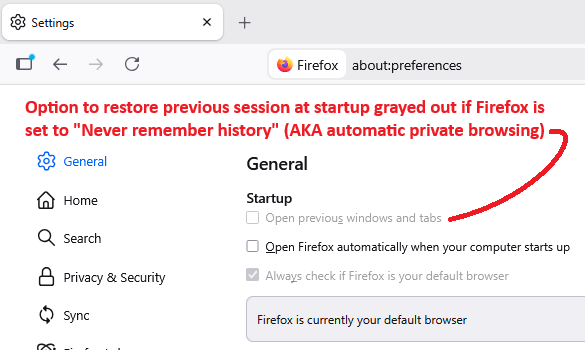
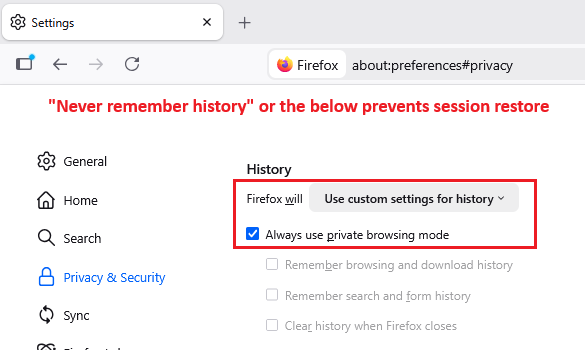
Regarding the setting, usually it's the first checkbox. Is it grayed out, or completely missing? It would be grayed out if Firefox is set to use automatic private browsing, since that prevents Firefox from writing history to disk. That situation looks like this:
If it's completely missing, hmm, could be worth checking whether an "Enterprise Policy" is modifying your Firefox. To check on that, type or paste about:policies in the address bar and press Enter to load the About Policies page. This page has two panels, Active and Documentation. Does the Active panel list anything, besides the usual message "The Enterprise Policies service is inactive."