


Search terms remain in address bar after pressing Enter. Is this new? Can it be disabled?

Just noticed this starting yesterday. Possibly it started when Ffox updated to v144.0 and I just didn't notice immediately.
I use the address bar (location bar, awesome bar) for searching (with Google, per settings). Up until very recently, the result of hitting Enter after entering my search string would be the URL for the Google results. This can be very handy to copy; e.g., when offering citations during an online discussion.
However, I don't see the URL anymore. After pressing Enter, my original search string remains there, in the address bar. That's not what I want. Using Google means my original search string is right there at the top of the page, in an input field, that can be made active with a single keystroke. Therefore, if it is intended to be helpful by keep the contents of the address bar what they were before I pressed Enter, may I just say that it is not.
Note: I can get the old desired behavior by going to google[.]com and entering the search string there, but that's an annoyance, after years of being able to simply hit Ctrl-L.
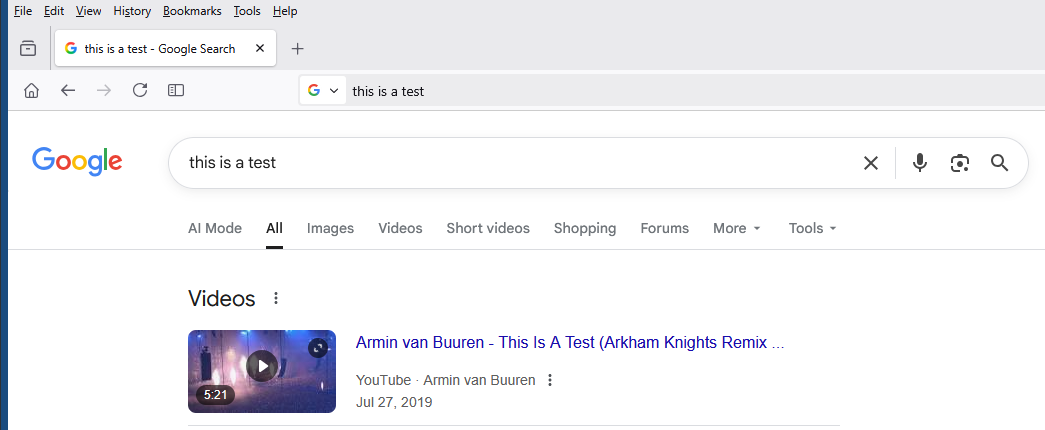
Attached is a screenshot of what I now see. Note what's in the address bar -- my original search string. Previously, it would have been something like "https://www.google.com/search?q=this+is+a+test&sca_esv=[ ...]"
Solution choisie
Toutes les réponses (4)
Solution choisie
Thank you, Agent virtuel.
I can't believe I didn't notice this behavior until now, if it has been around since v.137!
I suppose it's conceivable I accidentally ticked that box while looking for something else in Settings.
At any rate, problem solved. Thanks again.

I unchecked the show query in the address bar. I can now once again easily drag and drop the address to save it. Since the search query wording remains in the Google Query Field below the address bar, I can see no reason for the check box to show the query wording in the address bar. If I want to modify the query it is just as easy to go to the Google Query field, and still keep the current query result in the address bar.
Incidentally, The Italics button for this comment box inserts "" marks around the highlighted text instead of italicizing it.
@K7WCS
Just to let you know I saw your comment. I had already done that, after reading earlier suggestions, but thanks, nonetheless.