


Paper Tray Printing

How do I get Firefox to print using a different paper tray. I want to print from the rear tray on my Epson 8550 but it always prints from the inner cassette
Solution choisie
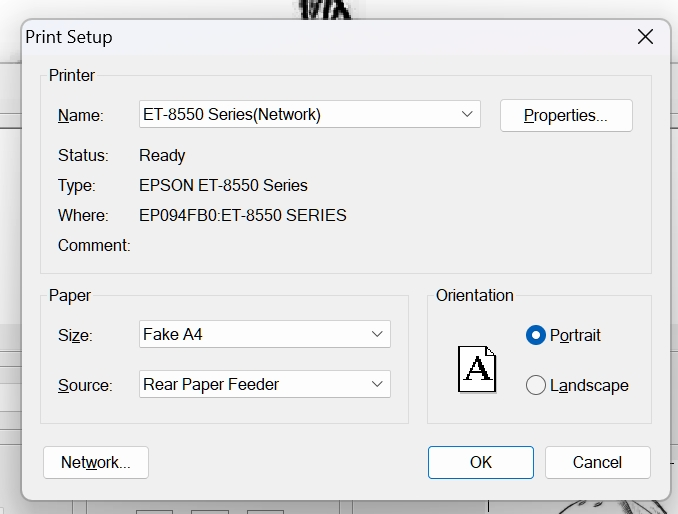
Thanks for that. I found a workaround. I defined a new paper type called fake A4 with dimensions just slightly different than A4 and set my epson printer to associate that paper type with the particular paper tray. Now when I print CRM Firefox using that paper type from Firefox Epson takes care of choosing the right Parker tray. It's just a pity to have to do so much fiddling when Firefox could easily add paper tray to its printer dialoge and defaults.
Toutes les réponses (6)
Hi Andrew
This does not sound like an issue with Firefox but is something that you may be able to change in the Windows printer settings.
No, all other programs let you select the paper tray. Firefox doesn't have that option but it just changed on me recently. I just don't know how it sets it's default printer paper tray. It's not my actual windows default.

Show the print options from a windows print test showing the tray options. Then also post a screenshot showing the print options you see in Firefox with the print preview showing the print tray options.
The problem seems to be that Firefox just doesn't use the default paper tray. AS you can see when I ask for the printer dialog in another application it has the default oi rear paper tray. When I print that's where it goes. When I try to print from Firefox and use the printer driver option (as there is no option for tray in the standard settings) I see exactly the same screen with the same default to rear paper tray. But when I actually print, it goes to cassette 2 not the rear paper tray. It just ignores that setting.
andrew122 said
How do I get Firefox to print using a different paper tray. I want to print from the rear tray on my Epson 8550 but it always prints from the inner cassette
Hey, had the same issue! What worked for me was going to File > Print, then click on "Printer Properties" or "Preferences" (depends on your setup). From there, I picked the rear feed tray manually. Firefox doesn’t always remember it, so I set it in the Epson driver settings too, just to be safe. Bit annoying, but works.
Solution choisie
Thanks for that. I found a workaround. I defined a new paper type called fake A4 with dimensions just slightly different than A4 and set my epson printer to associate that paper type with the particular paper tray. Now when I print CRM Firefox using that paper type from Firefox Epson takes care of choosing the right Parker tray. It's just a pity to have to do so much fiddling when Firefox could easily add paper tray to its printer dialoge and defaults.