


Can't remove Old Firefox Data Folder from my desktop

I made the mistake to following Mozilla's advice on why my tabs stopped coming back after I closed out, despite the fact that I had that selected in my settings. Now I'm stuck with an "Old Firefox Data" folder on my desktop and I can't remove it because I need administrator privileges -- but it's my personal PC. WTF
Toutes les réponses (5)
I don't know why Administrator privileges would be required. Someone else reported that recently on Reddit. Here is what I suggested to them:
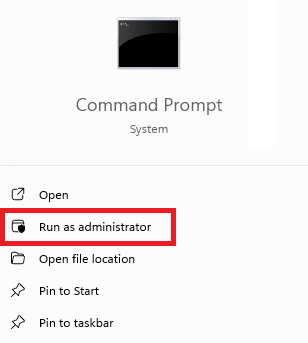
You could try using cmd.exe. If you do a search in the Windows system search box for cmd.exe, it should come up with a Run as Administrator option (screenshot attached):
Then in the little command window you can type or paste the "change directory" command:
cd %USERPROFILE%\Desktop
Here you can do some damage, so carefully type or paste the "remove directory" command:
rmdir /S "Old Firefox Data"
It will ask you to confirm. After you type y <enter> it should remove the folder and all its contents.
You can type or paste
exit
to close out cmd.exe.
Success?
I tried that earlier today and it didn't work. I'll give it another shot, but doubtful.
I get an error message on entering: cd %USERPROFILE%\Desktop It says the path isn't found.
tom.hudak said
I get an error message on entering: cd %USERPROFILE%\Desktop It says the path isn't found.
That's strange! Can you cd to the root of the C drive and then navigate step by step?
cd C:\
cd users
cd <your user name>
cd desktop
That "Old Firefox Data" folder is hung up with One Drive. Even after I went to a help desk where I bought the PC it's still updating to friggin One Drive. This sucks.