


Windows 10 reached EOS (end of support) on October 14, 2025. For more information, see this article.

Rechercher dans l’assistance

Évitez les escroqueries à l’assistance. Nous ne vous demanderons jamais d’appeler ou d’envoyer un SMS à un numéro de téléphone ou de partager des informations personnelles. Veuillez signaler toute activité suspecte en utilisant l’option « Signaler un abus ».

En savoir plus

Home Button goes away

  • 1 réponse
  • 0 a ce problème
  • 52 vues
  • Dernière réponse par bitdecay

options supplémentaires

My toolbar is visible when I click on the 'Open a new tab' plus sign at the top. But if I go to a site, either from a search or from bookmarks, the toolbar disappears.

I just (yesterday) had to delete profile, delete bookmarks, delete Firefox, install Firefox, in order to get it where it would save bookmarks again. The toolbar, prior to that, did NOT disappear when I went to a new site.

Please help.

My toolbar is visible when I click on the 'Open a new tab' plus sign at the top. But if I go to a site, either from a search or from bookmarks, the toolbar disappears. I just (yesterday) had to delete profile, delete bookmarks, delete Firefox, install Firefox, in order to get it where it would save bookmarks again. The toolbar, prior to that, did NOT disappear when I went to a new site. Please help.

Solution choisie

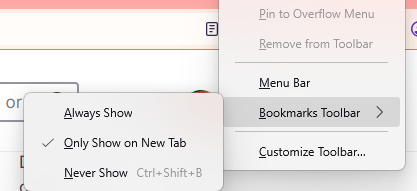
If you are referring to the bookmark toolbar, then it may have been customized to only appear on a new tab. In order to make it appear always at the top, right-click on an empty tab bar, go to "Bookmarks toolbar", then select "Always Show".
Lire cette réponse dans son contexte 👍 1

Toutes les réponses (1)

options supplémentaires

Solution choisie

If you are referring to the bookmark toolbar, then it may have been customized to only appear on a new tab. In order to make it appear always at the top, right-click on an empty tab bar, go to "Bookmarks toolbar", then select "Always Show".

Poser une question

Vous devez vous identifier avec votre compte pour répondre aux messages. Veuillez poser une nouvelle question, si vous n’avez pas encore de compte.