


Thunderbird Update
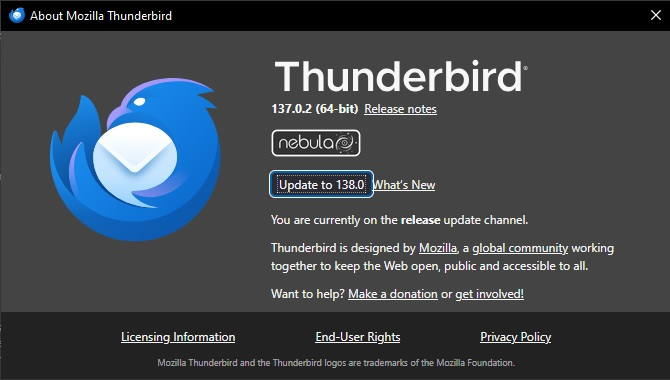
I am currently running Thunderbird 137.0.2 (64-bit) and I don't get an automatic prompt for updates and haven't been getting them since I updated to Supernova and now Nebula.
I have the settings set to Check for updates, but let me choose whether to install them, which is the setting I have always had and I used to get automatic prompts for updates with a window opening to show the details of the update as I get in Firefox.
Can someone tell me how to get these automatic updates back.
I have attached a screenshot of the update window.
Thanks.
Toutes les réponses (8)
If you change the setting to not offer the prompt, do you get the notice?
What is your OS?
Wayne Mery said
If you change the setting to not offer the prompt, do you get the notice? What is your OS?
I don't see a setting to not offer the prompt!
Windows 10
I get the prompt, but only when I click help>about. Is there another one?
david said
I get the prompt, but only when I click help>about. Is there another one?
You're getting the same problem as me because Thunderbird always gave an automated prompt just as Firefox does, without having to click help>about, until we upgraded to the newer versions when the automated prompting disappeared!
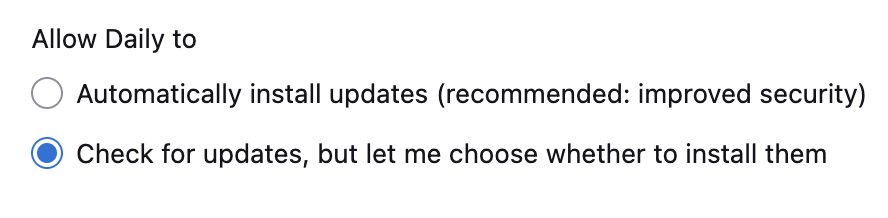
(In this screen shot)
The second option, currently enabled, should give a prompt. The first option, should not give you a choice.
Wayne Mery said
(In this screen shot) The second option, currently enabled, should give a prompt. The first option, should not give you a choice.
That's what I thought as I have always got this send option enabled in Firefox and Thunderbird but it's only Thunderbird that doesn't give a prompt!
Does anyone know if this is a bug that has been reported on Bugzilla?
Dave,
If you are still having problems when using a newer version, please post a new question and we'll take a new look at it.