


Windows 10 reached EOS (end of support) on October 14, 2025. For more information, see this article.

Rechercher dans l’assistance

Évitez les escroqueries à l’assistance. Nous ne vous demanderons jamais d’appeler ou d’envoyer un SMS à un numéro de téléphone ou de partager des informations personnelles. Veuillez signaler toute activité suspecte en utilisant l’option « Signaler un abus ».

En savoir plus

How can I create a new Saved Search?

  • 1 réponse
  • 0 a ce problème
  • 60 vues
  • Dernière réponse par david

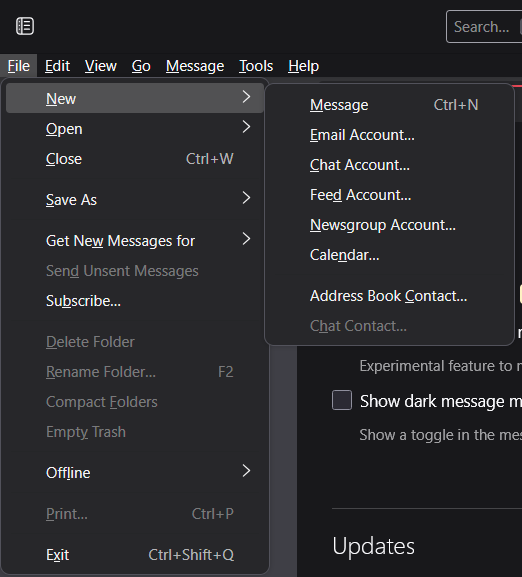
This page describes that one can create a saved search by going to File -> New -> Saved Search. However, on my version of Thunderbird (Version 136.0.1 on Windows 11), this button doesn't exist for me (see attached). I'd use the keyboard shortcut Ctrl-Shift-F to search and then save as a Saved Search, but the result I get looks different from the New Saved Search Folder window in the linked support page. In particular, I want to create a Saved Search that scans across multiple different inboxes, but this isn't possible starting from a search. What can I do here?
[https://support.mozilla.org/en-US/kb/using-saved-searches This page] describes that one can create a saved search by going to File -> New -> Saved Search. However, on my version of Thunderbird (Version 136.0.1 on Windows 11), this button doesn't exist for me (see attached). I'd use the keyboard shortcut Ctrl-Shift-F to search and then save as a Saved Search, but the result I get looks different from the New Saved Search Folder window in the linked support page. In particular, I want to create a Saved Search that scans across multiple different inboxes, but this isn't possible starting from a search. What can I do here?
Captures d’écran jointes

Toutes les réponses (1)

I will report the page to developers. This appears to be something in flux. To create a saved search, click the edit>find and then click the button to create a saved search and do that on next pane. Documentation on this could be easier, I agree.