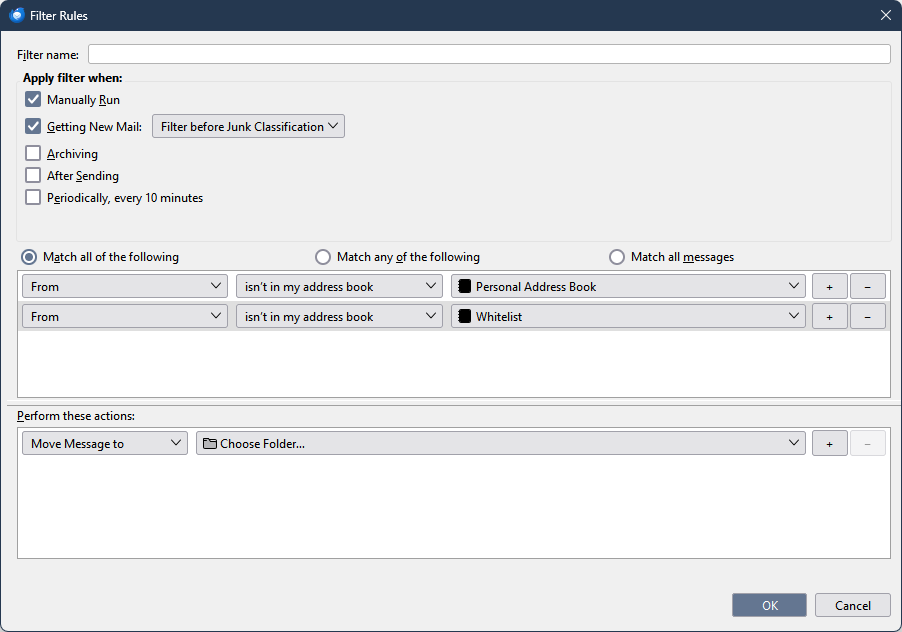
in my message filtering, how do I specify that an email address exists in my address book

I've set up filters to eliminate all the spam I get, using a White list and a Black list. While that mostly worked, I wanted a better idea. So I got rid of the blacklist, and just have a White list. If any email address isn't in the White list, I want the email to be automatically transferred to the Junk emal folder.
The concept seems to work, except that I want to also accept all email in my address book when it falls thru the whitelist filter, but I don't know how to specify this. Is it possible?
Toutes les réponses (1)
I think a filter like the one in the attached picture will work. Whitelist is an address book that has the whitelisted contacts. Contacts can be copied between address books by drag and drop, while holding Ctrl. Contacts can be added to Personal Address Book from messages by clicking the icon beside the sender in the message header, and can be added to other address books by clicking the icon twice.