


CAN NOT LOGIN TO MY "LIVE.COM.AU" EMAIL ACCOUNT

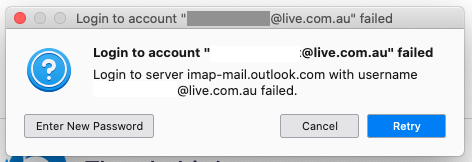
Have used Thunderbirds since converting to Mac in 2013. Now Thunderbirds will not let me login to my @live.com.au account. I get the attached message each time I try to login. However I can receive mail on Messages using my iPad but that is IMAP configured and the Laptop Pro is POP configured. I can also login to my gmail accounts OK on Thunderbirds Please be patient with me as being in my 80's my IT ability is limited. Regards Deryck
Toutes les réponses (1)
Your settings need to be up-dated. HotMail, Outlook and Live all use the same.
Press Alt-e and choose 'Account Settings' from the drop-down menu that appears, then click 'Server Settings' under the Live account and enter these details:—
 Server Name: outlook.office365.com
 Port: 995 [You may see 993 quoted but that's for IMAP]
 User Name: <your e-mail address>
 Connection security:  SSL/TLS
 Authentication method: OAuth2
Now click 'Outgoing Server (SMTP)' in the left hand column. Double click the 'Outlook.com (Microsoft)' entry and enter these details:—
 Server Name: smtp.office365.com
 Port: 587
 Connection security: STARTTLS
 Authentication method:  OAuth2
 User Name: <your e-mail address>