


Add-ons don't work, and tabs crash, since update to F36

$ dnf list installed | grep firefox firefox.x86_64 100.0-4.fc36
Since upgrading to Fedora 36, Firefox seems to have stopped being stable at all. Having any add-ons enabled causes webpages to frequently break. Even in troubleshooting mode, I get a tab crash immediately on start, and infrequently during later browsing.
Troubleshooting mode has the same issues, trying a completely clean profile has the same issues. Chromium works with no issues.
See tab crash report here: https://pastebin.com/wNPFhpgN
Toutes les réponses (5)

In the address box, type about:crashes<enter>. Note: If any reports do not have BP- in front of the numbers/letters, click it to submit them.
The crash report is several pages of data. We need the report numbers to see the whole report.
Using your mouse, mark the most recent 7 - 10 Submitted crash reports, and copy them. Now go to the reply box and paste them in.
Please, Do not post a screenshot ! !
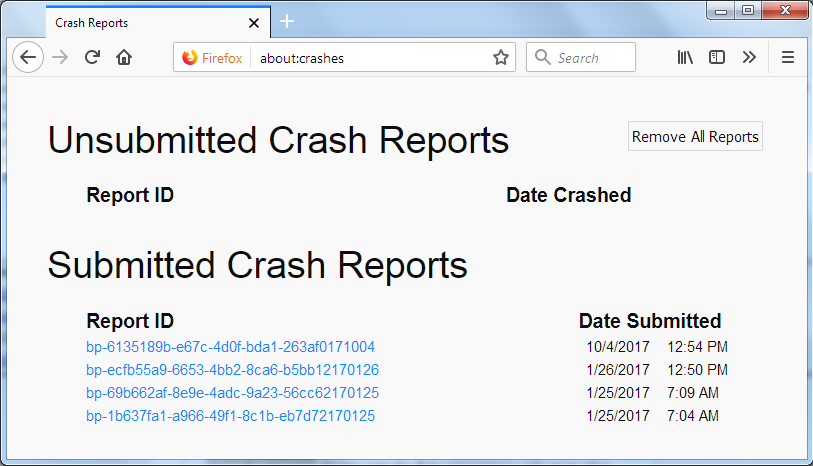
For more help on crash reports, see; https://support.mozilla.org/en-US/kb/firefox-crashes-asking-support
Solution choisie
Are you currently using a version from the repositories of your Linux distribution? Try the Firefox version from the official Mozilla server: https://www.mozilla.org/en-US/firefox/all/
Thanks very much for the response, please see the crash IDs:
bp-c5677430-8f33-45a5-8fd7-648d80220519 19/05/2022, 13:27 bp-af162e78-6339-4dbc-8a73-8a5e70220519 19/05/2022, 12:42 bp-61e902b5-1801-48ec-ba61-c21870220519 19/05/2022, 14:33 bp-fb79d36e-b9e8-4a59-b0cc-fb8d10220519 19/05/2022, 14:33 bp-3d026d37-a68c-4d2a-949e-305e40220519 19/05/2022, 14:33 bp-e82f06e7-3624-4d22-baa4-c99060220519 19/05/2022, 14:33 bp-ccc6cb2c-55bc-4fba-8d38-5755a0220519 19/05/2022, 14:33 bp-fb145fea-91a8-4c1b-8a3d-5d60a0220519 19/05/2022, 14:33 bp-34dd532b-4666-419b-a9b5-616990220519 19/05/2022, 14:33 bp-561a2cd0-e11c-46aa-aabc-3d5c30220519 19/05/2022, 14:33
Some of them are after I've messed about with my video drivers, to no change.
I am currently using my system repo - Source : firefox-100.0-4.fc36.src.rpm Repository : @System From repo : updates
I'll give the official server download a try and report back.
Welp, looks like the official download version 100.0.1 works perfectly! Guess I should be more patient for an update from the repo. Really pleased to have my sweet sweet addons back.
Thanks for the assistance!
Glad to help. Safe Surfing.
This question has been locked because the original author has deleted their account. While you can no longer post new replies, the existing content remains available for reference.