


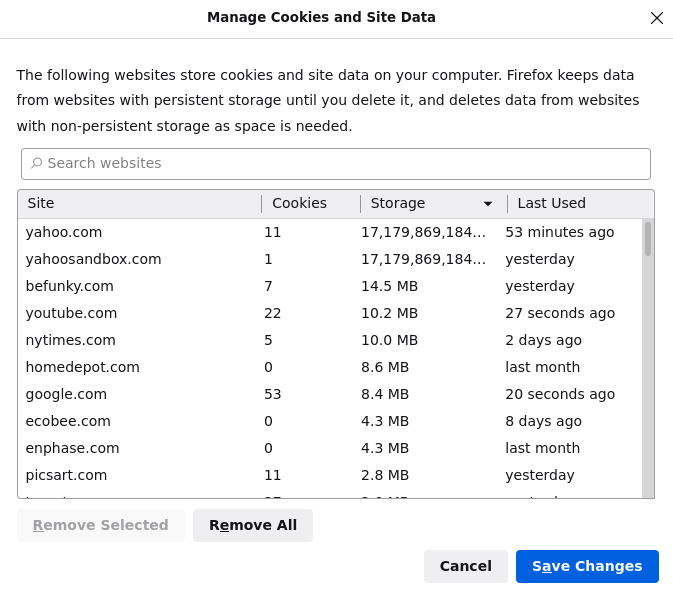
Your stored cookies, site data, and cache are currently using 17,179,869,184 GB of disk space.

Problems with slowness and crashing. Checked manage data and found this message: Your stored cookies, site data, and cache are currently using 17,179,869,184 GB of disk space. Cleared yahoo.com and yahoosandbox. A few days ago it was google.com causing this same absurd data message. v 94.0 on Linux

Solution choisie
mspohr said
Considering nuking it completely and starting over.
Try this first;
Use these links to create a new profile. Use this new profile as is. Is the problem still there?
https://support.mozilla.org/en-US/kb/how-run-firefox-when-profile-missing-inaccessible
http://kb.mozillazine.org/Profile_folder_-_Firefox#Navigating_to_the_profile_folder
https://support.mozilla.org/en-US/kb/profile-manager-create-and-remove-firefox-profiles
https://support.mozilla.org/en-US/kb/back-and-restore-information-firefox-profiles
Type about:profiles<enter> in the address bar.
Toutes les réponses (5)
This could be from corrupt files.
- Cookies
If clearing cookies didn't help then it is possible that the cookies.sqlite file that stores the cookies got corrupted.
Rename (or delete) cookies.sqlite (cookies.sqlite.old) and delete other present cookies files like cookies.sqlite-journal in the Firefox profile folder in case the file cookies.sqlite got corrupted. http://kb.mozillazine.org/Cookies
https://support.mozilla.org/kb/Deleting+cookies ++++++++++++++++++++++++++++++++++++++++++
- Cache
Location of the cache/cache2 folder; Windows: *C:\Users\<user>\AppData\Local\Mozilla\Firefox\Profiles\<profile>\ Mac: ~/Library/Caches/Firefox/Profiles/ Linux: ~/.cache/mozilla/firefox/
Close Firefox. Open your file browser to the above and remove the folder.
Can't find cookies.sqlite but deleted all cooking and cache... problem persists. Looked up Cache ~/.cache/mozilla/firefox/ contains several subfolders. "remove the folder" ? Which folder?
Are you able to determine what takes up this large disk space ? Is this in the secondary location where the disk cache (cache2) is stored (~/.cache/mozilla/firefox/) or in the storage folder in the main location (~/.mozilla/firefox/) ?
The large storage use is reported by the Manage Data app to be "cookies and site data" as shown in the image attached to the OP. The large numbers seem to be attached to random web sites. The amount of storage used is an absurdly large number which exceeds the storage capacity of any computer so I don't think it's real. I've tried reinstalling Firefox and it still happens. Considering nuking it completely and starting over.
Solution choisie
mspohr said
Considering nuking it completely and starting over.
Try this first;
Use these links to create a new profile. Use this new profile as is. Is the problem still there?
https://support.mozilla.org/en-US/kb/how-run-firefox-when-profile-missing-inaccessible
http://kb.mozillazine.org/Profile_folder_-_Firefox#Navigating_to_the_profile_folder
https://support.mozilla.org/en-US/kb/profile-manager-create-and-remove-firefox-profiles
https://support.mozilla.org/en-US/kb/back-and-restore-information-firefox-profiles
Type about:profiles<enter> in the address bar.