

Ce sujet de discussion a été archivé.
Veuillez poser une nouvelle question si vous avez besoin d’aide.

Archivé
Audio interface blocking part of screen when using Spotify app
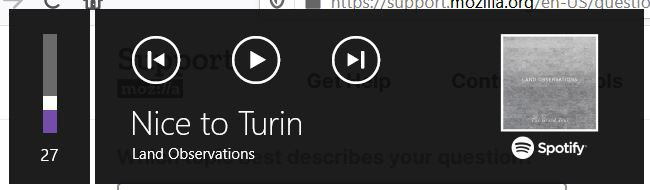
Recently, Firefox started to place the box you see below over my screen when I played audio. I looked up the problem and was able to disable the feature by setting media.hardwaremediakeys.enabled = false. Now audio from other tabs doesn't cause the box to appear and block the screen, however it still appears when Spotify is running. How can I stop this happening?
Recently, Firefox started to place the box you see below over my screen when I played audio. I looked up the problem and was able to disable the feature by setting ''media.hardwaremediakeys.enabled = false''. Now audio from other tabs doesn't cause the box to appear and block the screen, however it still appears when Spotify is running. How can I stop this happening?
Toutes les réponses (2)
You can set media.hardwaremediakeys.enabled = false on the about:config page.
You can open the about:config page via the location/address bar. You can click the button to "Accept the Risk and Continue".
As I said, I've already done that, but it hasn't worked for Spotify.