


Autostart with Windows startup
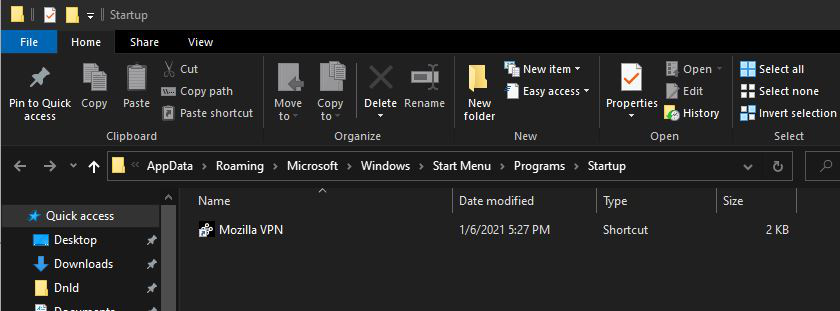
Looked, but didn't find any articles on how to allow Mozilla VPN to start with Windows. This actually should be a feature built into its settings. I did find a way though, by adding the shortcut to windows 10 startup folder. Simple task but it should be automatic through the settings. Thanks for listening.
Mike
Solution choisie
Hey Mike,
Unfortunately, the auto-start isn't an auto-connect feature. It will simply start the app up when you start the computer. You still have to manually toggle the VPN on. I'm sorry for the inconvenience. We have received a lot of feedback regarding a desire for auto-connect, and we are looking to add it very soon.
Regards,
Lire cette réponse dans son contexte 👍 0Toutes les réponses (4)

Hello,
Can you open the Control Panel and go to System and Security > Administrative Tools > Services and scroll down to Mozilla VPN Broker? Right-click on the Mozilla VPN Broker and ensure the startup type is set to automatic.
Let us know if this helped.
Sorry to take so long to respond. I get quite busy. Took a look at what you described. The service is already set to automatic. But that doesn't mean the VPN is active. I have to manually start the user interface and change the slide switch to "on". Isn't there some way to start the VPN to active mode when Windows starts? (FYI: I entered the app start command in the Windows start folder so that the user interface app starts with windows, but that doesn't activate the VPN) Thanks much, Mike
I see someone else has requested this feature (see link below). The article states that it's not an option yet. I'll just hang in there until it is. Thanks, Mike
Solution choisie
Hey Mike,
Unfortunately, the auto-start isn't an auto-connect feature. It will simply start the app up when you start the computer. You still have to manually toggle the VPN on. I'm sorry for the inconvenience. We have received a lot of feedback regarding a desire for auto-connect, and we are looking to add it very soon.
Regards,