


The chat and hamburger icon are overlaid on the window minimise, maximise,and close icons and cannot be clicked on, Thunderbird portable 60 windows 10 64 bit.

Having upgraded to Thundrbird 60 (portable version) the menu and title bars seem to have become amalgamated so that the chat and hamburger icons are overlaid on the windows control buttons (minimise, maximise, and close) so cannot be clicked or moved in customise mode as the windows control buttons take priority.
Solution choisie
Suggestion from a developer....
Do you have a userChrome.css file in the profile that might affect this?
If not try to renaming xulstore.json in profile with closed TB. This resets the whole appearance.
Lire cette réponse dans son contexte 👍 1Toutes les réponses (6)
Does it also happen if started thusly https://support.mozilla.org/en-US/kb/safe-mode-thunderbird ?
Please post a screen shot
It does not occur in safe mode. Screenshot also posted of problem.
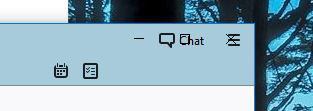
Thank you for testing safe mode. That's a strong indication that an installed theme, extension or some other customization is causing the issue. Can you research those items?
I only have two extensions, Lightning and provider for google calendar, no other addons, extensions, or themes.
Solution choisie
Suggestion from a developer....
Do you have a userChrome.css file in the profile that might affect this?
If not try to renaming xulstore.json in profile with closed TB. This resets the whole appearance.
No userChrome.css file in the profile but renanaming the xulstore.json file with Thunderbird closed reset everything so I now no longer have the chat and hamburger menus overlaid on top of the windows buttons.