


Menu-options-layout- what happened to the calandar right pane option?
This option to select a calandar pane on the right side in the "Layout" sub menu was there and now "poof" it's gone as is the calandar pane. I found this extremely handy for reminders of up coming events, without having to switch out of the main email screen.
Toutes les réponses (11)

Is View-Today Pane what you are looking for.
No...goto Menu - Options - Layout....should be a menu item for a calendar that will be on the right side of the page (In verticle view). It shows upcoming events for the next 5 days. This menu item and functional 5 day calendar were there and then disappeared. ??? I can probably get it back by reloading the program but I want an answer why a menu item just disappears.
This image shows what a stock Thunderbird layout menu looks like. If you had anything different you must have installed an add on to give that choice. What do you have listed under Add ons - Extensions?
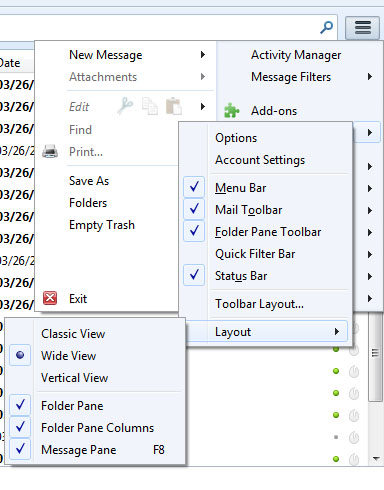
No add on's or extensions...and I know what the layout menu looks like and I know what the menu use to look like and the 5 day calendar pane, as I used it for over a year. I just got a new computer and had to reload everything, and it seems that is when it disappeared. Probably a casulty of the last beta "update" since some one thinks "lightning" is a great product. I don't....If you never have seen this right hand 5 day calendar, you must not have used Thunderbird for very long. I don't need any more "answers" ????
No probem. You seem to know it all anyway.
Actually I don't "know it all" but enough to check other sources for answers. It seems that newer versions of Thunderbird no longer "autoload" Lightning so you have to add it on to get the right side 5 day pane I was missing. Never knew that is where it orginated from. i still don't like the full size calendar portion of Lightning but the 5 day is very handy.....
Lightning, the calendar, has had a longstanding problem in that it would reappear after an update even if the user had previously de-selected it. And contrary to what you say, it has for the past year or so automatically been bundled with Thunderbird, which has caused annoyance to those who didn't want it, since it would be delivered and then enabled due to the above-mentioned problem.
Without your being aware of it, you must at some time in the past have elected to install and enable Lightning. The puzzle on this occasion is why it became disabled or de-installed. If you were not aware that Lightning furnished the Today plane, might you not have declined it if it was offered to you?
Oleguy43 said
It seems that newer versions of Thunderbird no longer "autoload" Lightning so you have to add it on to get the right side 5 day pane I was missing. Never knew that is where it orginated from. i still don't like the full size calendar portion of Lightning but the 5 day is very handy.....
Hence the reason I asked what add ons you had. But you decided you knew better than I and decided to tell me that instead of answering the question.
Zenos, thanks for an accurate and informative answer. Probably your analysis of me not knowing that Lightning was bundled and an install option that I declined is on point. I found that my Privacy Suite program also removes Lightning so that solves that mistery also. Thanks!
Oleguy43 What Privacy Suite are you using? It might answer some of the multitudes of bug that get files about Lightning not appearing after an update.
Matt...CyberScrub Privacy Suite Ver. 6.0.5.XXX. Most likely Thunderbird has the Lightning add on located in some folder that PrivacySuite eliminates when run. Haven't taken the time to isolate that, once I have, I will set the folder to "disregard" in PrivacySuite and that should solve my problem. Cheers!