


Windows 10 reached EOS (end of support) on October 14, 2025. If you are on Windows 10, see this article.

Rechercher dans l’assistance

Évitez les escroqueries à l’assistance. Nous ne vous demanderons jamais d’appeler ou d’envoyer un SMS à un numéro de téléphone ou de partager des informations personnelles. Veuillez signaler toute activité suspecte en utilisant l’option « Signaler un abus ».

En savoir plus
Archivé

Calendar error after Lightning update

Hillbilly

TB 54.1.1 on Linux after last update (22 May 17?) An error was encountered preparing the calendar located at googleapi://xxxx@gmail.com/?calendar=yyyygmail.com for use. It will not be available. [Exception... "Component returned failure code: 0x80570015 (NS_ERROR_XPC_CI_RETURNED_FAILURE) [nsIJSCID.createInstance]" nsresult: "0x80570015 (NS_ERROR_XPC_CI_RETURNED_FAILURE)" location: "JS frame :: resource://calendar/modules/calUtils.jsm -> file:///zzzz.default/extensions/%7Be2fda1a4-762b-4020-b5ad-a41df1933103%7D/calendar-js/calCalendarManager.js :: calCalendarManager.prototype.createCalendar :: line 446" data: no] Any ideas?

TB 54.1.1 on Linux after last update (22 May 17?) An error was encountered preparing the calendar located at googleapi://xxxx@gmail.com/?calendar=yyyygmail.com for use. It will not be available. [Exception... "Component returned failure code: 0x80570015 (NS_ERROR_XPC_CI_RETURNED_FAILURE) [nsIJSCID.createInstance]" nsresult: "0x80570015 (NS_ERROR_XPC_CI_RETURNED_FAILURE)" location: "JS frame :: resource://calendar/modules/calUtils.jsm -> file:///zzzz.default/extensions/%7Be2fda1a4-762b-4020-b5ad-a41df1933103%7D/calendar-js/calCalendarManager.js :: calCalendarManager.prototype.createCalendar :: line 446" data: no] Any ideas?

Toutes les réponses (4)

Edit Lightning 5.4 update 24 May 17

I have the problem too.
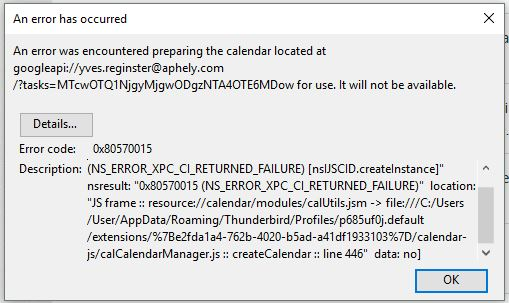
I did solve it but I cannot be sure how. I think it was as simple as updating gContactSync in Extensions.

I simply went back to previous version of Thunderbird. de-install Thunderbird, re-install and install again Provider for Google Calendar.

My issue is now solved.