


Why are my regular emails now being marked as Spam

Most of my incoming e-mails from regular contacts are suddenly marked as Spam
Toutes les réponses (1)
RE: 'marked as Spam' If you are seeing the word 'Spam' then it is being applied by either the server (you may be able to switch this off server side, but for minor irritation it would be worth keeping) or you have installed spam software like Spam Assassin and are using it. Thunderbird does not add 'Spam' to any email. Thunderbird uses the word 'Junk'.
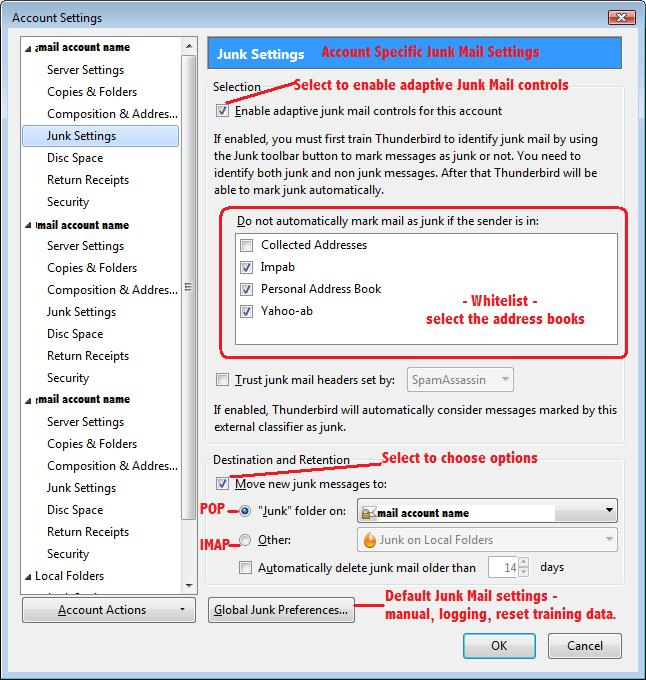
If emails marked as 'Spam' are being auto moved to the 'Junk' folder, then check the accounts 'Junk settings'. Right click on mail account name in folder Pane and select 'Settings'. Then select 'Junk settings' for the mail account. If you have selected/ enabled the checkbox to 'trust junk mail headers set by ' and selected one from the drop down list, then those emails will be auto moved to junk. To stop moving those emails to 'Junk' folder: uncheck the check box and click on OK
Added image as aid
Modifié le par Toad-Hall