


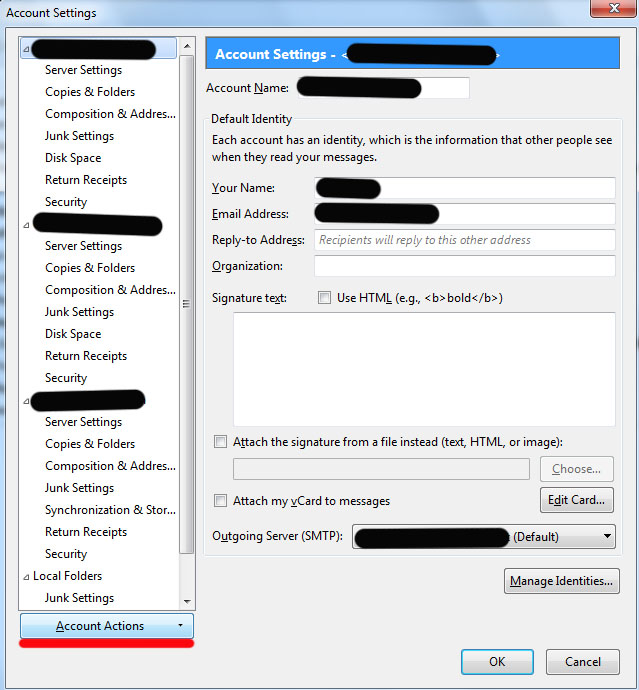
Can't find the Account Actions button in order to Add Mail Account
Sorry for a dumb question, but I'm reading instructions from "support.mozilla.org" on how to add a second email account (already exists) to Thunderbird. It says to click the Account Actions button, but I'll be darned if I can find it.
Also, it successfully set up my main Outlook.com account, but was it supposed to import my Contacts? It didn't.
Toutes les réponses (2)

Solution choisie
Account Actions is at the very bottom of the account list on the left side when you are viewing Account Settings. See attached image.
That being said, that is the long way to get there in my opinion.
On the menu bar you can use File-New-Existing Mail Account. Press the alt key if your menu bar is hidden.
If using the 3 line AppMenu button the hid Existing Mail Account under New Message for some unknown reason.
Thanks much. Yes, the problem was that the menu bar was hidden--that's what I'm familiar with. I've now successfully added my local ISP provider. I couldn't get Windows 10 Mail to work AT ALL, and none of Microsoft's suggestions were working, so I'm thankful I found Thunderbird!