


Printer Error - An error occurred while printing.

Hi There,
I'm using Firefox Developer Edition and systematically get the error message mentioned above while trying to "print" (immediately after Cmd + P) ... actually I have no printer connected to my mac (and never had) but I would like to "print" to get a PDF file...
Any clue?
Thanks for your help.
Cheers
Claude
Toutes les réponses (4)
As a Windows user, I'm a bit in the dark about the MacOS X PDF printer option. Does it work in other applications even without any actual physical printer available?
Was anything in this article helpful: Fix printing problems in Firefox?
Actually I never had the problem with the standard version of Firefox where I could "print" a PDF file without any printer connected (I did it on the same computer with the same configuration).
The article is maybe not valid for the Developer Edition because either while using about:config or in prefs.js I don't find the mentioned fields (print_printer for instance)...
Hey,
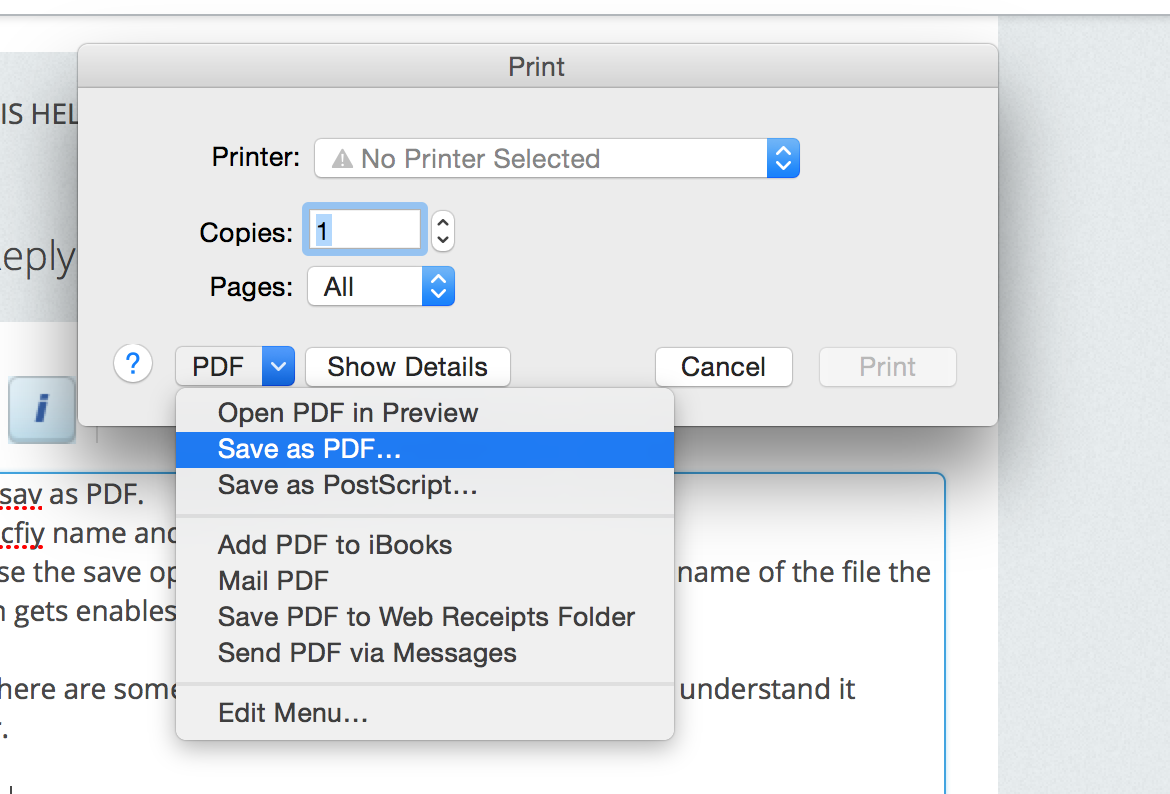
you can save your page as PDF in mac OS. just follow the simple steps. 1. press cmd+p 2. where the option is PDF click there and a drop down menu appears. Select there sav as PDF. 3. Specfiy name and location
in case the save option doesn't appear buy changing the name of the file the option gets enables.
note: here are some screen shot attached so that you can understand it better.
thanks tell us was this helpful to you
That's the point... with Cmd + P I get the error message "Printer Error - An error occurred while printing" and never have the window I was used to see in the standard edition...