Windows 10 reached EOS (end of support) on October 14, 2025. If you are on Windows 10, see this article.

Rechercher dans l’assistance

Évitez les escroqueries à l’assistance. Nous ne vous demanderons jamais d’appeler ou d’envoyer un SMS à un numéro de téléphone ou de partager des informations personnelles. Veuillez signaler toute activité suspecte en utilisant l’option « Signaler un abus ».

En savoir plus
Archivé

Label Printing Issue

grampp1 a répondu
grampp1

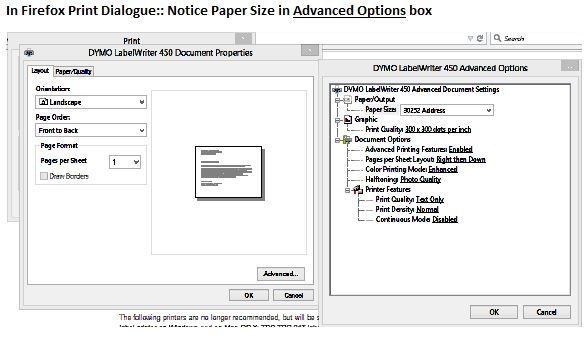
I am trying to print to a Dymo LabelWriter 450 Label printer and Firefox is not remembering the label size that I specified in Printer properties and set as default. Ie: I have set labels 30857 Badge Labels as default, but Firefox reverts back to 30252 Address Labels, so the "name tags" do not print correctly. If I change this in the Print Dialogue properties in Firefox, it's good for 1 printing, then reverts back.

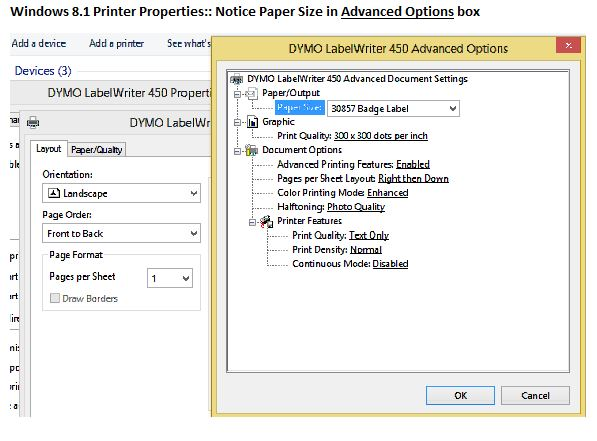
I am using Windows 8.1 and have changed my paper size for Printer Preference and Printer Properties via Control Panel. And an FYI, I have been through the Fix printing issues in Firefox solution already without success in any of the recommended steps.

Any insight would be greatly appreciated!!

I am trying to print to a Dymo LabelWriter 450 Label printer and Firefox is not remembering the label size that I specified in Printer properties and set as default. Ie: I have set labels 30857 Badge Labels as default, but Firefox reverts back to 30252 Address Labels, so the "name tags" do not print correctly. If I change this in the Print Dialogue properties in Firefox, it's good for 1 printing, then reverts back. I am using Windows 8.1 and have changed my paper size for Printer Preference and Printer Properties via Control Panel. And an FYI, I have been through the Fix printing issues in Firefox solution already without success in any of the recommended steps. Any insight would be greatly appreciated!!

Toutes les réponses (1)

Here are a couple of pics of the Properties setup as it appears in Firefox and as it appears in the Windows dialogue/setup