


What can I do about tabs overlapping each other?

Like anyone else who uses TVTropes and/or Wikipedia, my web browsing experience can get to the point where I have a lot of tabs open. Like 30+. I have Tab Mix Plus set so that tabs condense themselves to fit the tab bar, but ever since Australis hit, the tabs overlap when this happens. Aside from this making it really difficult to select the correct tabe, generally what's covered up is the tab close button, so this is a SUPER annoyance. I had installed 24ESR but now that it's updated I guess I have no choice but to fix this or go to Pale Moon :|
What can be done here? I have Classic Theme Restorer set to the old tab style, and STILL this happens. I don't want to have to deal with tab scrolling.
Toutes les réponses (9)
Try Firefox Safe Mode to see if the problem goes away. Firefox Safe Mode is a troubleshooting mode that turns off some settings, disables most add-ons (extensions and themes).
If Firefox is open, you can restart in Firefox Safe Mode from the Help menu:
- In Firefox 29.0 and above, click the menu button
 , click Help
  and select Restart with Add-ons Disabled.
- In previous Firefox versions, click on the Firefox button at the top left of the Firefox window and click on Help (or click on Help in the Menu bar, if you don't have a Firefox button) then click on Restart with Add-ons Disabled.
If Firefox is not running, you can start Firefox in Safe Mode as follows:
- On Windows: Hold the Shift key when you open the Firefox desktop or Start menu shortcut.
- On Mac: Hold the option key while starting Firefox.
- On Linux: Quit Firefox, go to your Terminal and run firefox -safe-mode
(you may need to specify the Firefox installation path e.g. /usr/lib/firefox)
When the Firefox Safe Mode window appears, select "Start in Safe Mode".
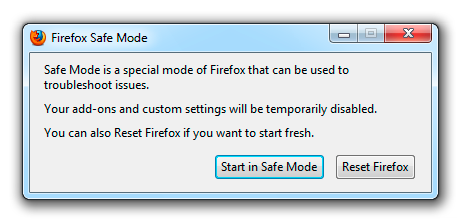
If the issue is not present in Firefox Safe Mode, your problem is probably caused by an extension, and you need to figure out which one. Please follow the Troubleshoot extensions, themes and hardware acceleration issues to solve common Firefox problems article to find the cause.
To exit Firefox Safe Mode, just close Firefox and wait a few seconds before opening Firefox for normal use again.
TabMix Plus and Custom Theme Restorer may not play well together, so you may want to troubleshoot for a conflict.
Does this still happen with either TMP or CTR enabled (i.e. not both)?
Try to install the latest dev version of Tab Mix Plus or ask advice at the Tab Mix Plus forum.
See the sticky on the Tab Mix Plus forum:
Safe Mode just goes back to regular old Australis and spreads the tabs wide and far. Not an option.
The problem persists with CTR enabled and TMP disabled, and TMP enabled/CTR disabled. Clearly it's something to do with the actual setting of the minimum tab width, but not having that makes Firefox unusable for me.
Only an extension (or possibly code in userChrome.css) can set a minimum width for the tabs.
What minimum value are you using for the tabs and what tab style?
Can you attach a screenshot?
- http://en.wikipedia.org/wiki/Screenshot
- https://support.mozilla.org/kb/how-do-i-create-screenshot-my-problem
- Use a compressed image type like PNG or JPG to save the screenshot
- Make sure that you do not exceed the maximum size of 1 MB
The minimum value (in Tab Mix Plus - it apparently takes precedence over CTR) is 8 px. It's been that way for a while but obviously tabs never get that small because even the icon is 15-20 px. I'm using the squared tabs style in CTR.
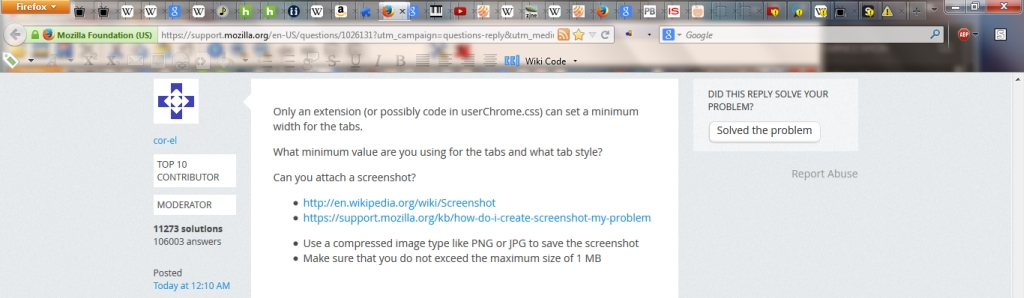
To compare, I installed Pale Moon and installed TMP with the same minimum value... then opened 77 tabs. While the close tab buttons do run together and become useless in such an extreme, the tabs themselves are still distinct. This is what used to happen when opening a horde of tabs in Firefox:

oh, I also did install the dev version of TMP. Same thing.
Not sure if this will work with the Australis interface, but I set a minimum width for Firefox browser tabs in userChrome.css with this code:
.tabbrowser-tab[fadein]:not([pinned]) {
  min-width: 16px !important;
}
It didn't. They still run all over each other. I think it has something to do with the shape and boundaries of the tabs, not the size, but it's been three days and not only has no solution been found, I'm discovering more issues caused by Australis's restrictions while trying to find one. Looks like I'm going to PaleMoon.
Modifié le par ratchetchan