


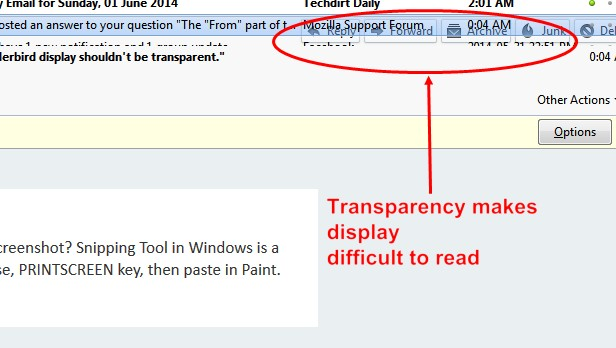
The "From" part of the Thunderbird display shouldn't be transparent.
Transparent mail bar makes it difficult to locate gap between mail header and mail listings above mail header. The "From" part shouldn't be transparent. This is a recent problem, not apparent in older version
Solution choisie
Version 32 was released and the problem is fixed, so it was a Thunderbird bug. Thanks for your help. I'll mark this as solved"
Lire cette réponse dans son contexte 👍 0Toutes les réponses (15)

Could you provide a screenshot? Snipping Tool in Windows is a good choice. Otherwise, PRINTSCREEN key, then paste in Paint.
Thanks for offering to help. Does this show enough?

Are you using the default theme?
Try to start Thunderbird in safe mode. https://support.mozilla.org/en-US/kb/safe-mode
I don't set anything in Thunderbird, i.e. themes, etc. I just use it as it downloads & installs. Safemode doesn't seem to have any effect on the display.
Well, transparency is only a small part of your problem. You have many overlapping controls. And what has caused the truncated appearance of the line of text immediately below the blue header?
Can you post your settings please?
Help|Troubleshooting Information
Clear the "include account names" checkbox.
Click on "copy text to clipboard"
Use paste to place the copied text into your reply here.
I wonder if you unknowingly have the "Conversations" add-on installed.
It's just the top line of the bottom part that is transparent. I've shown it on the attached image. It's harmless enough, but quite distracting. Possibly a design accident of some kind?
Settings (I removed some printer settings because the attachment is over the limit):
Application Basics
   Name: Thunderbird
   Version: 30.0
   User Agent: Mozilla/5.0 (Windows NT 6.1; WOW64; rv:30.0) Gecko/20100101 Thunderbird/30.0
   Profile Folder: Show Folder
             (Local drive)
   Application Build ID: 20140509030228
   Enabled Plugins: about:plugins
   Build Configuration: about:buildconfig
   Memory Use: about:memory
 Mail and News Accounts
   account1:
     INCOMING: account1, , , plain, passwordCleartext
     OUTGOING: , plain, none, true
   account2:
     INCOMING: account2, , (none) Local Folders, plain, passwordCleartext
   account4:
     INCOMING: account4, , , plain, passwordCleartext
     OUTGOING: , plain, none, true
   account5:
     INCOMING: account5, , , plain, passwordCleartext
     OUTGOING: , plain, none, true
   account6:
     INCOMING: account6, , , plain, passwordCleartext
     OUTGOING: , plain, none, true
 Crash Reports
   http://crash-stats.mozilla.com/report/index/bp-8b2b1730-d61a-490a-afad-143c02131009 (2013-10-09)
 Extensions
   Google Calendar Tab, 3.9, true, googlecalendartab@momo
   Lightning, 2.6.5, true, {e2fda1a4-762b-4020-b5ad-a41df1933103}
   EPUBReader, 1.4.2.1, false, {5384767E-00D9-40E9-B72F-9CC39D655D6F}
   Firebug, 1.10.3, false, firebug@software.joehewitt.com
   Flagfox, 4.2.1, false, {1018e4d6-728f-4b20-ad56-37578a4de76b}
   Html Validator, 0.9.5.1, false, {3b56bcc7-54e5-44a2-9b44-66c3ef58c13e}
   TinEye Reverse Image Search, 1.1, false, tineye@ideeinc.com
   Toggle Web Developer Toolbar, 4.0, false, {c75a27d8-4529-449f-b67b-aba65d7a1c0a}
   uTorrentControl2, 10.10.27.6, false, {687578b9-7132-4a7a-80e4-30ee31099e03}
   Website Detective Hosting Information Provider, 0.5, false, contact.websitedetective@gmail.com
   Youtube High Definition, 4.0, false, {7b1bf0b6-a1b9-42b0-b75d-252036438bdc}
   Zoom Downloader, 1.0, false, downloadmanager@zoomdownloader.com
Important Modified Preferences
Name: Value
     accessibility.typeaheadfind.flashBar: 0
     browser.cache.disk.capacity: 358400
     browser.cache.disk.smart_size.first_run: false
     browser.cache.disk.smart_size.use_old_max: false
     browser.cache.disk.smart_size_cached_value: 358400
     browser.display.use_document_fonts: 0
     browser.sessionstore.resume_from_crash: false
     dom.w3c_touch_events.expose: false
     extensions.lastAppVersion: 30.0
     font.internaluseonly.changed: true
     font.minimum-size.x-western: 10
     font.name.monospace.el: Consolas
     font.name.monospace.tr: Consolas
     font.name.monospace.x-baltic: Consolas
     font.name.monospace.x-central-euro: Consolas
     font.name.monospace.x-cyrillic: Consolas
     font.name.monospace.x-unicode: Consolas
     font.name.sans-serif.el: Calibri
     font.name.sans-serif.tr: Calibri
     font.name.sans-serif.x-baltic: Calibri
     font.name.sans-serif.x-central-euro: Calibri
     font.name.sans-serif.x-cyrillic: Calibri
     font.name.sans-serif.x-unicode: Calibri
     font.name.sans-serif.x-western: Courier New
     font.name.serif.el: Cambria
     font.name.serif.tr: Cambria
     font.name.serif.x-baltic: Cambria
     font.name.serif.x-central-euro: Cambria
     font.name.serif.x-cyrillic: Cambria
     font.name.serif.x-unicode: Cambria
     font.size.fixed.el: 14
     font.size.fixed.tr: 14
     font.size.fixed.x-baltic: 14
     font.size.fixed.x-central-euro: 14
     font.size.fixed.x-cyrillic: 14
     font.size.fixed.x-unicode: 14
     font.size.fixed.x-western: 12
     font.size.variable.el: 17
     font.size.variable.tr: 17
     font.size.variable.x-baltic: 17
     font.size.variable.x-central-euro: 17
     font.size.variable.x-cyrillic: 17
     font.size.variable.x-unicode: 17
     font.size.variable.x-western: 12
     gfx.direct3d.last_used_feature_level_idx: 0
     mail.openMessageBehavior.version: 1
     mail.winsearch.firstRunDone: true
     mailnews.database.global.datastore.id: 2301fff1-4510-426f-914d-e9761f7e090
     network.cookie.prefsMigrated: true
     places.database.lastMaintenance: 1401228145
     places.history.expiration.transient_current_max_pages: 104858
     plugin.importedState: true
      print.printer_Brother_HL-2270DW_series.print_bgcolor: false
     print.printer_Brother_HL-2270DW_series.print_bgimages: false
     print.printer_Brother_HL-2270DW_series.print_colorspace:
     print.printer_Brother_HL-2270DW_series.print_command:
     print.printer_Brother_HL-2270DW_series.print_downloadfonts: false
     print.printer_Brother_HL-2270DW_series.print_duplex: 0
     print.printer_Brother_HL-2270DW_series.print_edge_bottom: 0
     print.printer_Brother_HL-2270DW_series.print_edge_left: 0
     print.printer_Brother_HL-2270DW_series.print_edge_right: 0
     print.printer_Brother_HL-2270DW_series.print_edge_top: 0
     print.printer_Brother_HL-2270DW_series.print_evenpages: true
     print.printer_Brother_HL-2270DW_series.print_footercenter:
     print.printer_Brother_HL-2270DW_series.print_footerleft: &PT
     print.printer_Brother_HL-2270DW_series.print_footerright: &D
     print.printer_Brother_HL-2270DW_series.print_headercenter:
     print.printer_Brother_HL-2270DW_series.print_headerleft: &T
     print.printer_Brother_HL-2270DW_series.print_headerright: &U
     print.printer_Brother_HL-2270DW_series.print_in_color: true
     print.printer_Brother_HL-2270DW_series.print_margin_bottom: 0.5
     print.printer_Brother_HL-2270DW_series.print_margin_left: 0.5
     print.printer_Brother_HL-2270DW_series.print_margin_right: 0.5
     print.printer_Brother_HL-2270DW_series.print_margin_top: 0.5
     print.printer_Brother_HL-2270DW_series.print_oddpages: true
     print.printer_Brother_HL-2270DW_series.print_orientation: 0
     print.printer_Brother_HL-2270DW_series.print_page_delay: 50
     print.printer_Brother_HL-2270DW_series.print_paper_data: 1
     print.printer_Brother_HL-2270DW_series.print_paper_height: 11.00
     print.printer_Brother_HL-2270DW_series.print_paper_name:
     print.printer_Brother_HL-2270DW_series.print_paper_size_type: 0
     print.printer_Brother_HL-2270DW_series.print_paper_size_unit: 0
     print.printer_Brother_HL-2270DW_series.print_paper_width: 8.50
     print.printer_Brother_HL-2270DW_series.print_plex_name:
     print.printer_Brother_HL-2270DW_series.print_resolution: 0
     print.printer_Brother_HL-2270DW_series.print_resolution_name:
     print.printer_Brother_HL-2270DW_series.print_reversed: false
     print.printer_Brother_HL-2270DW_series.print_scaling: 1.00
     print.printer_Brother_HL-2270DW_series.print_shrink_to_fit: true
     print.printer_Brother_HL-2270DW_series.print_to_file: false
     print.printer_Brother_HL-2270DW_series.print_unwriteable_margin_bottom: 0
     print.printer_Brother_HL-2270DW_series.print_unwriteable_margin_left: 0
     print.printer_Brother_HL-2270DW_series.print_unwriteable_margin_right: 0
     print.printer_Brother_HL-2270DW_series.print_unwriteable_margin_top: 0
     privacy.cpd.cache: false
     security.default_personal_cert: Select Automatically
     security.disable_button.openCertManager: false
     security.disable_button.openDeviceManager: false
     security.OCSP.disable_button.managecrl: false
Graphics
     Adapter Description: Intel(R) HD Graphics
     Vendor ID: 0x8086
     Device ID: 0x0102
     Adapter RAM: Unknown
     Adapter Drivers: igdumd64 igd10umd64 igd10umd64 igdumd32 igd10umd32 igd10umd32
     Driver Version: 8.15.10.2696
     Driver Date: 3-19-2012
     Direct2D Enabled: true
     DirectWrite Enabled: true (6.2.9200.16571)
     ClearType Parameters: ClearType parameters not found
     WebGL Renderer: false
     GPU Accelerated Windows: 2/2 Direct3D 10
     AzureCanvasBackend: direct2d
     AzureSkiaAccelerated: 0
     AzureFallbackCanvasBackend: cairo
     AzureContentBackend: direct2d
JavaScript
Incremental GC: 1
Accessibility
   Activated: 0
   Prevent Accessibility: 0
Library Versions
     Expected minimum version
     Version in use
     NSPR
     4.10.4
     4.10.4
     NSS
     3.16 Basic ECC
     3.16 Basic ECC
     NSS Util
     3.16
     3.16
     NSS SSL
     3.16 Basic ECC
     3.16 Basic ECC
     NSS S/MIME
     3.16 Basic ECC
     3.16 Basic ECC
So, how do we square
"I don't set anything in Thunderbird, i.e. themes, etc. I just use it as it downloads & installs."
with this? ;-)
Extensions
  Google Calendar Tab, 3.9, true, googlecalendartab@momo
  Lightning, 2.6.5, true, {e2fda1a4-762b-4020-b5ad-a41df1933103}
  EPUBReader, 1.4.2.1, false, {5384767E-00D9-40E9-B72F-9CC39D655D6F}
  Firebug, 1.10.3, false, firebug@software.joehewitt.com
  Flagfox, 4.2.1, false, {1018e4d6-728f-4b20-ad56-37578a4de76b}
  Html Validator, 0.9.5.1, false, {3b56bcc7-54e5-44a2-9b44-66c3ef58c13e}
  TinEye Reverse Image Search, 1.1, false, tineye@ideeinc.com
  Toggle Web Developer Toolbar, 4.0, false, {c75a27d8-4529-449f-b67b-aba65d7a1c0a}
  uTorrentControl2, 10.10.27.6, false, {687578b9-7132-4a7a-80e4-30ee31099e03}
  Website Detective Hosting Information Provider, 0.5, false, contact.websitedetective@gmail.com
  Youtube High Definition, 4.0, false, {7b1bf0b6-a1b9-42b0-b75d-252036438bdc}
  Zoom Downloader, 1.0, false, downloadmanager@zoomdownloader.com
I have to say there are several things there which don't appear to me to have any obvious value or purpose in an email client. However, you say that safe mode didn't change anything, which pretty much rules out add-ons. Nevertheless, yours looks very different from mine, but I refuse to have those ugly space-wasting buttons in the middle of the screen. ;-)
Those are all Firefox tools, nothing to do with Thunderbird AFAIK. I'm just sending the printout as requested. I have no idea what goes on in the cellar behind my back :-) None of the items listed, save Web Developer & Firebug, are installed, but they're not Thunderbird plug-ins.
Lightning specifically is a genuine Thunderbird add-on. I'm surprised at the presence of other extensions that I'd usually associate with Firefox, such as Flagfox.
However, Plugins are system wide, so any installed for a browser will be visible in other applications. I think this would account for the html and downloader tools in particular.
Hmmm. "Version: 30.0". You know you're running a beta, where inconsistencies such as this are to be expected?
AFAIK, Lightning, TinEye, ePub, uTorrent, etc,were "uplugged" ages, even years, ago.
I'm not aware that 30.0 is a Beta version. I just accept the updates as they appear in my incoming notices. If I see something haywire, like this transparent item, I simply make it known. Not sure if the developers are aware of cosmetic bloopers like this, which is why I spoke up here. It's a bonus if someone here knows how to fix it :-)
Could this be something Windows is effecting?
Control Panel > Personalization > Window colour and Appearance what colour scheme is selected?
eg: I'm using Vista and have 'Windows Vista Basic' selected No issues.
"Could this be something Windows is effecting?"
It could be, but I'm using Windows 7. Thunderbird should be able to work with Windows, I'm thinking.
Thunderbird works well with Windows 7 for me.
What Windows theme are you using? What screen resolution.?
'Control panel' > 'Appearance and Personalization' Under 'Personalization' What are the current settings you are using under these options?
- 'change the theme'
- 'change window glass colours'
Under 'Display' What are the current settings you are using for:
- 'Adjust screen resolution'
Solution choisie
Version 32 was released and the problem is fixed, so it was a Thunderbird bug. Thanks for your help. I'll mark this as solved"