


Want an Extension to appear in the toolbar (Awesome Screen Shot)

I had Awesome Screen Shot on my navigation toolbar. With a new update of my system (windows?) it no longer appears. How can I get the Awesome Screen Shot button to re-appear on my navigation toolbar? (It was next to the "home" button before).

بخشها
Maybe double-check that you have the awesome screenshot extension installed? You can download it again from here - https://addons.mozilla.org/en-US/firefox/addon/awesome-screenshot-capture-/
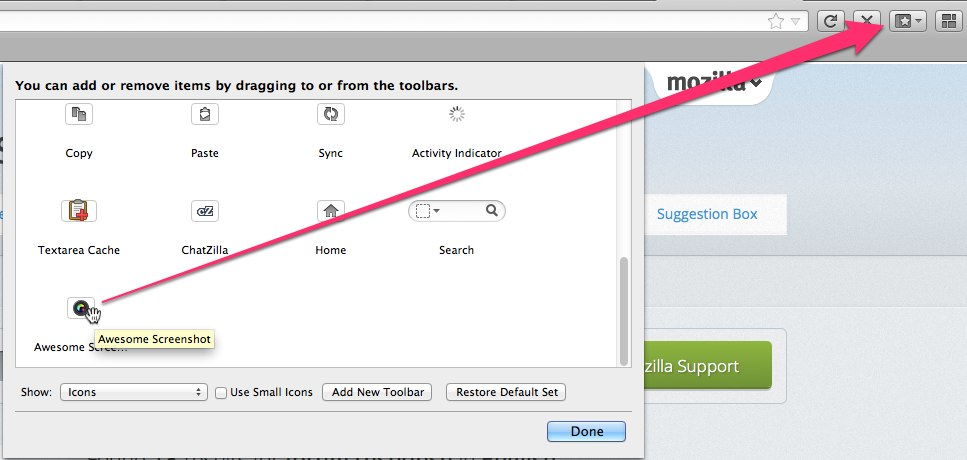
I have it installed. I had to scroll way down to the bottom of the customize window to find the button (see screenshot).
پاسخها (4)
You can do that by customizing the toolbar. Just right-click on it and choose customize. More info here - Customize Firefox controls, buttons and toolbars
Thanks for the suggestion, but it doesn't help. By following your suggestion I have the ability to add certain icons, but not the Awesome Screen Shot extension.
Any other ideas?
بخشها
Maybe double-check that you have the awesome screenshot extension installed? You can download it again from here - https://addons.mozilla.org/en-US/firefox/addon/awesome-screenshot-capture-/
I have it installed. I had to scroll way down to the bottom of the customize window to find the button (see screenshot).
You know it was installed already but I took your suggestion, deleted it and RE installed it and it works! So thanks for the suggestion. I'm back in business.