


Server Settings::"When I delete": folder forgotten on quit

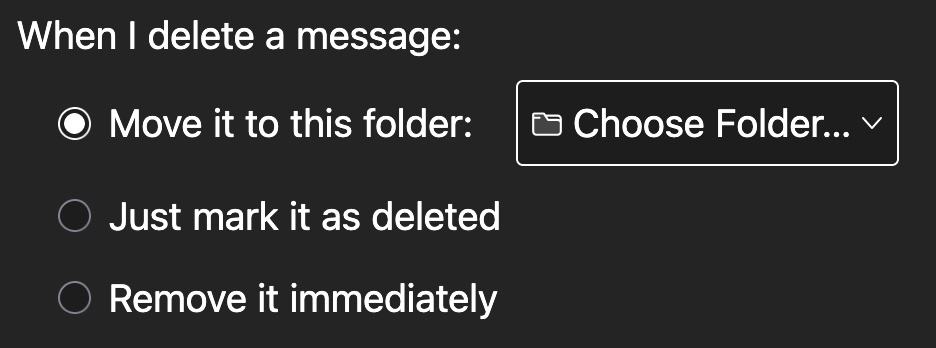
Upon opening the macOS application, Server Settings "When I delete a message:" on my primary email account appears as shown in the image. If I don't change the dropdown to select Trash, deleted messages disappear as if the "Remove it immediately" radio button were on.
I have my Mac set to open Thunderbird at startup; after (infrequent) rebooting I haven't remembered to change the dropdown menu setting until I go looking in vain in Trash for a recently-deleted message that I want to review.
Docs say that Trash is the default, and another IMAP email account retains the "Trash" folder setting across Thunderbird restarts, so I believe that it being forgotten for my primary account is a bug or corruption symptom.
This issue has been present for some unknown number of versions through the current one.
بخشها
When deleted messages are missing in the IMAP account trash folder in Thunderbird, are they also missing in the webmail of Fastmail?
If we can't find a solution I advocate to create a new Thunderbird profile, set up only the problematic IMAP account and test deleting messages.
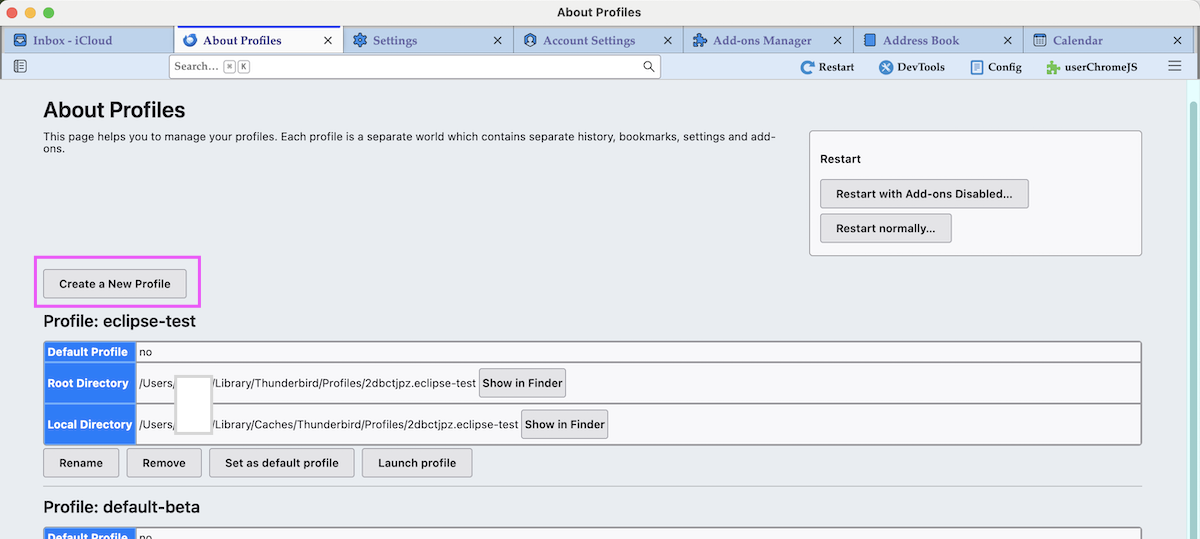
This is very easy to accomplish and takes a few minutes only: in the Thunderbird menu bar go to Help > Troubleshooting Information > Profiles > about:profiles This opens a new tab "About Profiles" with a summary of already existing profiles. Click on "Create a New Profile" button and follow instructions in the Profile Wizard.
ویرایش شده توسط Mapenzi
پاسخها (22)
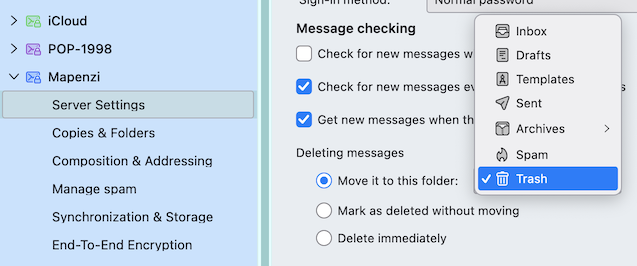
Which Thunderbird version are you running on your Mac? I have never seen this problem on any of my Macs with any Thunderbird version. Can't you select "Trash" in the "Choose Folder..." menu ? In my Thunderbird 160 and 153.7.0esr versions I can't even see "Choose Folder..." since there is just the twisty ∨ sign to open the little menu (see my attached image). And in all my IMAP accounts "Trash" (or "Deleted") is selected by default in the Server Settings.
This morning I updated to 153.7.0esr (aarch64J) but as I noted this issue has been present for a while. (This forum software asks for the version but I now see no display of it on my message.) Yes, I can select `Trash` in the `Choose Folder...` dropdown; indeed I must on each Thunderbird startup to avoid deleted messages silently vaporizing. As noted my other IMAP account does not have this issue.
I have no idea why Thunderbird would deselect the "Trash" folder automatically when you restart the app. And why is your "Choose Folder..." button so different from my button?
When you right-click on the IMAP account folder in the folder pane and choose "Subscribe..." do you see different choices for deleted messages in the folder list?
The lists of folders in `Subscibe...` and in `Choose Folder` are the same except that "Scheduled" appears only in `Subscribe...` and the ordering in `Subscribe...` is strictly alphanumeric but isn't in `Choose Folder`. Each of the folders in `Subscribe...` has a checkmark on its right.
What I was asking is are there several entries in the "Subscribe" window folder list for deleted messages, such as Trash, Deleted Messages or Deleted Items? (see picture)
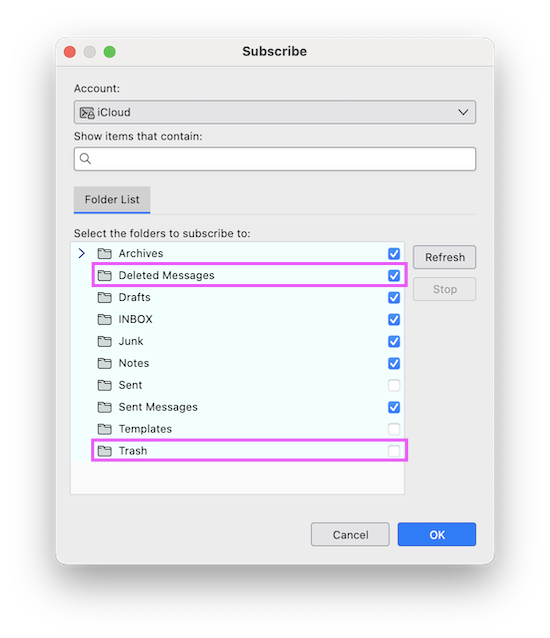
There's a Trash but no Deleted Messages or Items.
I am unable to explain the odd behaviour of this Trash folder. Does this happen in a GMail account? In Account Settings > account name > Server Settings > Message Storage did you check any of the two options (see image)?
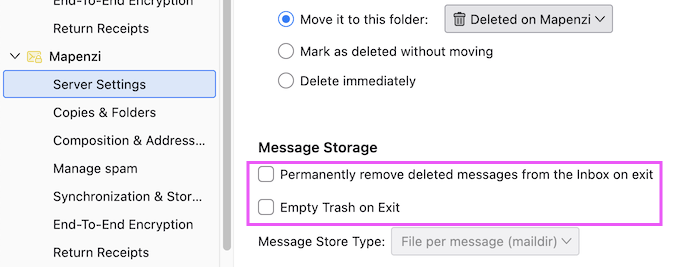
No, neither of those is checked.
The only gmail account I have forwards to my primary (problem) account so it's not an account in Thunderbird.
Did you take the screen shot of your first message in your own Thunderbird installation or did you find the picture in the web? Referring to the "Choose Folder..." button I still wonder why there is the difference between your picture and my screen shot which lacks the "Choose Folder" inscription.
All screen shots were taken by me. The initial "Choose Folder..." one is easily reproduced by quitting and re-opening the application (and entering the password). No recent re-installation.
brec said
The initial "Choose Folder..." one is easily reproduced by quitting and re-opening the application ...
I cannot reproduce the button with the "Choose Folder ... "button inscription. I tested it in several Thunderbird profiles as well as in the en-US, en-GB and en-CA versions.
brec said
(and entering the password).
Which password? The one for this particular email account or a primary password?
The primary password.
I meant easily reproduced by me. I intended to convey that it doesn't require a new installation.
I appreciate your dogged perseverance in trying to reproduce the problem.
I have a feeling the issue is with the mail server here.
What mail provider offers the mail account in question? Or is it perhaps self hosted?
Normally an IMAP server lists the folder to be used as deleted/trash/deleted item with a flag that Thunderbird recognizes.
SO there are I think a couple of possible points of failure. 1. Thunderbird is struggling with the server namespace in the IMAP context. 2. The server folder is not being correctly identified when Thunderbird connects.
Both of these things tend to appear more on self hosted servers, but they are both under normal IMAP standards, so with the server we might be able to work out a more concrete cause.
My other issue is what happen if you select Thunderbird to not load with the operating system? I have a feeling it might be a race condition exposed by the hurly burly of startup and a thousand an one things being done at once.
The provider of the problem account's server is Fastmail The issue occurs when Thunderbird is manually quit and re-started, not only when it's loaded at OS boot time. In sum, whenever the Thunderbird application is opened.
بخشها
When deleted messages are missing in the IMAP account trash folder in Thunderbird, are they also missing in the webmail of Fastmail?
If we can't find a solution I advocate to create a new Thunderbird profile, set up only the problematic IMAP account and test deleting messages.
This is very easy to accomplish and takes a few minutes only: in the Thunderbird menu bar go to Help > Troubleshooting Information > Profiles > about:profiles This opens a new tab "About Profiles" with a summary of already existing profiles. Click on "Create a New Profile" button and follow instructions in the Profile Wizard.
ویرایش شده توسط Mapenzi
Yes, they are also missing in app.fastmail.com.
After creating a new profile and launching it the first thing it wants is my email address. Can I use my canonical email address, i.e., the one used for the `default` profile which is the problem account?
Yes, just set up an IMAP account with your "canonical" email address since we want to test deleting messages in your problematic account. Don't import anything, don't install add-ons, just test this account.
ویرایش شده توسط Mapenzi
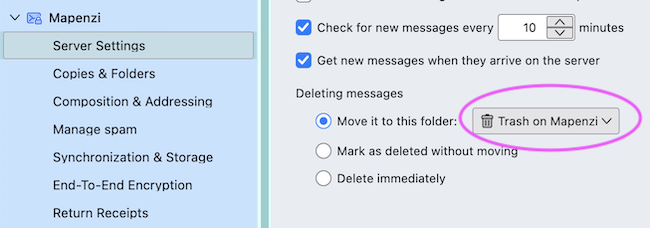
In the new profile's server settings the "When I delete a message" dropdown initially has "Trash on [email addr]" whereas the `default`, problem, profile has "Choose Folder..."
Thank you! So in the new profile you are seeing exactly the same button "Trash on [email addr]" button as shown in my screen shots. Did you test deleting messages and verify whether they are kept in this Trash folder? Does it also work when you restart Thunderbird only (not your Mac!) ?
Yes, same "Trash on [email addr]" in server settings and deleted messages go to Trash, and it persists through Thunderbird restarts. So: solved! I'm not sure which is the best reply to mark as the solution but I'm choosing the fifth one above in which you suggested creating a new profile.
I've made the new profile the default. I still have a question about how to get back to where I want to be with respect to adding other accounts and local folders, but I'll start a new topic for that.
THANKS!