


Outlook.com SMTP OAuth2 authentication fails with error 535 despite successful sign-in

My personal Outlook.com account can receive emails normally through Thunderbird IMAP, and sending emails through Outlook.com webmail also works.
However, SMTP sending in Thunderbird fails even though Microsoft OAuth2 sign-in completes successfully.
SMTP configuration:
- Server: smtp-mail.outlook.com
- Port: 587
- Security: STARTTLS
- Authentication: OAuth2
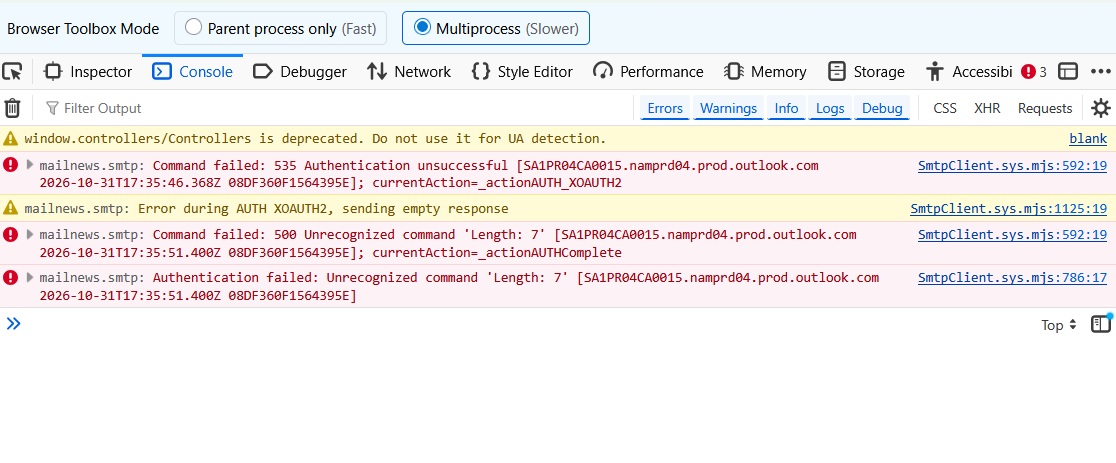
Thunderbird's Error Console shows:
- 535 Authentication unsuccessful
- Error during AUTH XOAUTH2
- 500 Unrecognized command 'Length: 7'
I have verified the settings and refreshed my OAuth2 credentials. The error persists.
This appears identical to Mozilla Bugzilla issue #1917321.
I contacted Microsoft Support (case #7111097598), but the agent referred me to Thunderbird without confirming whether SMTP AUTH is enabled for my mailbox.
Could someone help determine whether this is an OAuth2 configuration issue, a Thunderbird compatibility problem, or a Microsoft-side SMTP restriction?
پاسخها (3)
Do you have an antivirus product that might be scanning outgoing mail?
Thank you for your help! I have managed to resolve the issue.
--Original problem:--
I was unable to send emails from my personal Outlook.com account through Thunderbird, although receiving emails through IMAP and sending emails directly through Outlook.com on the web both worked normally.
I had previously been able to send emails through Thunderbird, but the last successful attempt was more than a year ago.
My SMTP settings were: - Server: smtp-mail.outlook.com - Port: 587 - Connection security: STARTTLS - Authentication method: OAuth2
Microsoft OAuth2 sign-in completed successfully, but sending still failed. Thunderbird's Error Console showed:
- `535 Authentication unsuccessful` - `Error during AUTH XOAUTH2, sending empty response` - `500 Unrecognized command 'Length: 7'`
- Troubleshooting performed:**
1. Verified the SMTP settings and changed the authentication method to OAuth2. 2. Restarted Thunderbird and refreshed the saved authentication credentials. The error persisted. 3. Contacted Microsoft Support, but they referred me back to Thunderbird without identifying the cause. 4. Temporarily disabled Trend Micro Maximum Security to test whether antivirus interference was responsible. The exact same errors persisted. 5. Confirmed that my VPN was disconnected during testing, making VPN interference unlikely.
- Solution:**
I eventually discovered that my Microsoft account's primary alias was different from the Outlook.com email address I had configured as the SMTP username in Thunderbird. My primary alias is a different email address that I used when I registered for my Outlook email.
I changed the **SMTP username in Thunderbird to my Microsoft account's primary alias**, without changing the SMTP server, port, security, or OAuth2 authentication method.
After making this change, Thunderbird successfully sent emails!
Importantly, I did not need to change my Microsoft account's primary alias or reconfigure my incoming IMAP settings.
This appears to be the same solution described by another user in [Mozilla Bug #1917321](https://bugzilla.mozilla.org/show_bug.cgi?id=1917321).
For anyone experiencing the same problem, I recommend checking whether the SMTP username matches the Microsoft account's primary alias, especially if the account has multiple email aliases.
Thank you again for your assistance. I hope this information helps others encountering the same SMTP authentication error.
ویرایش شده توسط ivanyuanjunior
Thank you for your help! I have managed to resolve the issue.
Original problem: I was unable to send emails from my personal Outlook.com account through Thunderbird, although receiving emails through IMAP and sending emails directly through Outlook.com on the web both worked normally.
I had previously been able to send emails through Thunderbird, but the last successful attempt was more than a year ago.
My SMTP settings were: - Server: smtp-mail.outlook.com - Port: 587 - Connection security: STARTTLS - Authentication method: OAuth2
Microsoft OAuth2 sign-in completed successfully, but sending still failed. Thunderbird's Error Console showed:
- `535 Authentication unsuccessful` - `Error during AUTH XOAUTH2, sending empty response` - `500 Unrecognized command 'Length: 7'`
Troubleshooting performed:
1. Verified the SMTP settings and changed the authentication method to OAuth2. 2. Restarted Thunderbird and refreshed the saved authentication credentials. The error persisted. 3. Contacted Microsoft Support, but they referred me back to Thunderbird without identifying the cause. 4. Temporarily disabled Trend Micro Maximum Security to test whether antivirus interference was responsible. The exact same errors persisted. 5. Confirmed that my VPN was disconnected during testing, making VPN interference unlikely.
Solution:
I eventually discovered that my Microsoft account's primary alias was different from the Outlook.com email address I had configured as the SMTP username in Thunderbird. My primary alias is a different email address I used when registering for my Outlook email.
I changed the **SMTP username in Thunderbird to my Microsoft account's primary alias**, without changing the SMTP server, port, security, or OAuth2 authentication method.
After making this change, Thunderbird successfully sent emails!
Importantly, I did not need to change my Microsoft account's primary alias or reconfigure my incoming IMAP settings.
This appears to be the same solution described by another user in [Mozilla Bug #1917321](https://bugzilla.mozilla.org/show_bug.cgi?id=1917321).
For anyone experiencing the same problem, I recommend checking whether the SMTP username matches the Microsoft account's primary alias, especially if the account has multiple email aliases.
Thank you again for your assistance. I hope this information helps others encountering the same SMTP authentication error.
ویرایش شده توسط ivanyuanjunior