


Change color of folder area of TB

I want to change and customize the background color of the left side of TB where the folders are listed. My current theme is "System theme- auto" version 1.4.2.
How is this done?
I'm running Debian 13
Thanks,
Craig
بخشها
Ok....fixed! Solution- Settings----Config Editor-----edit to TRUE toolkit.legacyUserProfileCustomizations.stylesheets
Couldn't determine why two of them same toolkit.legacyUserProfileCustomizations.stylesheets
....appeared in the Config Editor. (typical confusing programmer writing).
Thank you very much!
پاسخها (9)
You can copy & paste the following CSS code in a userChrome.css file
/* Folderpane tweaks */
 #folderPane {
 background-color: #C6D8DC !important; }
Please tell me if you are familiar with using CSS codes. Otherwise I'll give you further details
Well, here's my userChrome.css file-
/* Folder pane */
- folderPane,
- folderTree,
- folderTree treechildren {
background-color: #dbeafe !important;
}
/* Message list */
- threadTree,
- threadTree treechildren {
background-color: #dbeafe !important;
}
The problem is I don't know what to do with the file you provided? My guess is to use html color codes....but I'm not sure.
ویرایش شده توسط mycraigsl
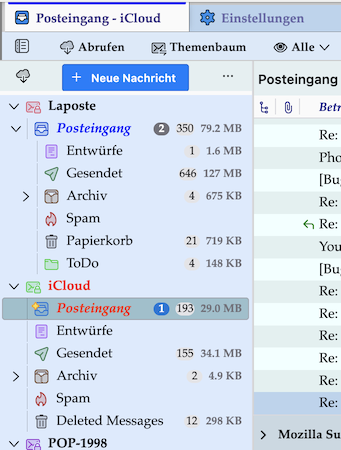
You have to put a hash sign # before folderpane; folderTree and treechildren are not necessary. So you should use the following CSS code
 #folderpane
  background-color: #dbeafe !important; }
At least it works for me (see image)
mycraigsl said
The problem is I don't know what to do with the file you provided? My guess is to use html color codes....but I'm not sure.
I didn't provide a file, only a CSS code to put in your userChrome.css file. Since you posted your actual code you seem to have a userChrome.css file already in your Thunderbird profile folder. To verify please go to your profile folder, look for a chrome folder and the userChrome.css file within chrome
Idem for the CSS code for your thread tree. You should use
 #threadTree{
 background-color: #dbeafe !important; }
ویرایش شده توسط Mapenzi
Yes, I have the file userChrome.css in my profile Chrome folder.
For whatever reason the userChrome.css code I pasted above provided a numbered list. That isn't present in my css file. I guess Mozilla somehow messed it up.
No matter the color codes I modify....no colors change.
But, the theme used says on the theme page of TB "Follow the operating system setting for buttons, menus, and windows."
Probably you didn't activate userChrome.css for use in Thunderbird. • Click on the app menu ≡ button in the upper right corner and select "Settings" • in the Settings tab choose General, scroll to the bottom and click on the "Advanced settings" button • this opens a new tab "Advanced Preferences" • search for the preference toolkit.legacyUserProfileCustomizations.stylesheets and toggle its value from false to true Now you userChrome should work
بخشها
Ok....fixed! Solution- Settings----Config Editor-----edit to TRUE toolkit.legacyUserProfileCustomizations.stylesheets
Couldn't determine why two of them same toolkit.legacyUserProfileCustomizations.stylesheets
....appeared in the Config Editor. (typical confusing programmer writing).
Thank you very much!
Now, what are the names of the other parts of TB that I can change the colors of? Such as, the top banner where all the File----Edit---Help...etc are located?
mycraigsl said
Now, what are the names of the other parts of TB that I can change the colors of?
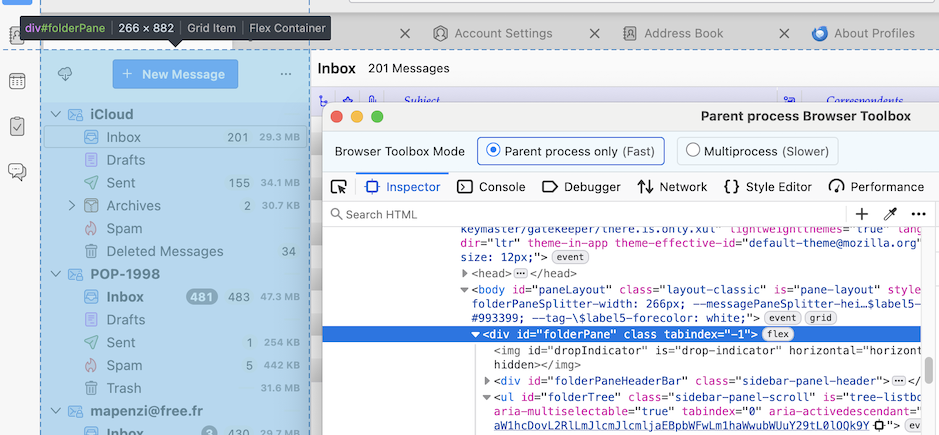
This is not the right place for a a general lecture about customising the different Thunderbird GUI elements via CSS codes in userChrome.css and userContent.css Some of us might propose CSS codes for a precise element and the wanted modification. You can also find solutions via your preferred search engine. Nowadays AI can be helpful, too., but as like with internet you must always have a critical look on the results. The Mozilla apps include a tool named "Developer Toolbox" which can be opened via Tools > Developer Tools > Developer Toolbox and its "Inspector" can be used to explore the UI elements and their corresponding CSS codes (see image)
mycraigsl said
Such as, the top banner where all the File----Edit---Help...etc are located?
This is the Thunderbird menu bar, and as a Mac user I am unable to give you a hint since in macOS versions of Thunderbird (and Firefox) menu bars are not part of the application main window.
ویرایش شده توسط Mapenzi