


از کلاهبرداری‌های پشتیبانی اجتناب کنید. ما هرگز از شما نمی‌خواهیم که با شماره تلفن تماس بگیرید یا پیامک ارسال کنید یا اطلاعات شخصی خود را هم‌رسانی کنید. لطفاً فعالیت‌های مشکوک را با استفاده از گزینه «گزارش سوءاستفاده» گزارش دهید.

مانند نخ كشيده
باز

Spell as you type not working

Graggs

So, I recently updated Thunderbird and I appear to have lost the Spell check as you type feature. By 'doesn't work' I mean; The incorrectly spelled word is underlined, but a right click shows; No Spelling Suggestion (which kind of suggested the feature can't find or isn't reading the dictionary)

I have done multiple things to try to get it to work.

I have checked I have the English Language Pack installed in Add-ons> Language I have check I have an English dictionary installed in Add-ons > Dictionary. (I have uninstalled the above and re-installed them too, including, shutting down Thunderbird in between)

I have unchecked the "Enable spell check as you type" in Settings > Composition, restarted Thunderbird and then re-checked it.

Quite by chance, while I was typing this, I added an Add-on called "Easy Table Editor by Cardella" And whilst testing it, I noticed the Spell Check as you Type worked in the Pop-up window and continued to work inside the inserted table in the compose window. NOTE: Text outside the table, still does NOT work.

Whilst playing around, I also used a Text Highlighter tool (TextMarker) and amazingly, text that has been highlighted, also seems to work with Spell Check as you Type.

I then deleted everything (Ctrl A) Delete. And any text I type, now responds correctly to the Spell Check as you Type.

So, something in the thml code seems to be disrupting the code?

I deleted this line and it works

I'm not convinced this is exactly what's causing it though? Anything I do within the ThunderHTMLedit window, then seems to allow Spell Check as you Type.

If I open a new message on an account without a template of any kind the Spell Check as you Type appears to work.

Next: I disabled ThunderHTMLedit rebooted Thunderbird and created a new message, but Spell Check as you Type still doesn't work, unless I disrupt the HTML by creating a table or highlighting the text.

I'm afraid I'm done now... hopefully someone will come up with a solution?
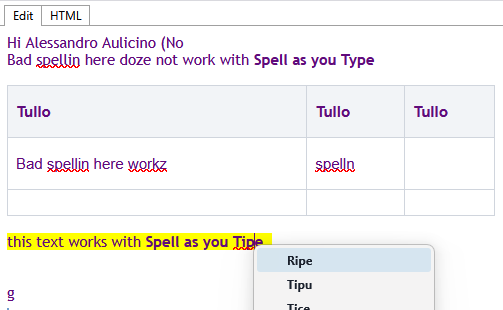
So, I recently updated Thunderbird and I appear to have lost the '''Spell check as you type''' feature. By 'doesn't work' I mean; The incorrectly spelled word is underlined, but a right click shows; No Spelling Suggestion (''which kind of suggested the feature can't find or isn't reading the dictionary'') I have done multiple things to try to get it to work. I have checked I have the English Language Pack installed in Add-ons> Language I have check I have an English dictionary installed in Add-ons > Dictionary. (I have uninstalled the above and re-installed them too, including, shutting down Thunderbird in between) I have unchecked the "Enable spell check as you type" in Settings > Composition, restarted Thunderbird and then re-checked it. Quite by chance, while I was typing this, I added an Add-on called "Easy Table Editor by Cardella" And whilst testing it, I noticed the Spell Check as you Type worked in the Pop-up window and continued to work inside the inserted table in the compose window. NOTE: Text outside the table, still does NOT work. Whilst playing around, I also used a Text Highlighter tool (TextMarker) and amazingly, text that has been highlighted, also seems to work with Spell Check as you Type. I then deleted everything (Ctrl A) Delete. And any text I type, now responds correctly to the Spell Check as you Type. So, something in the thml code seems to be disrupting the code? I deleted this line and it works <div class="smartTemplateHeader"> I'm not convinced this is exactly what's causing it though? Anything I do within the ThunderHTMLedit window, then seems to allow Spell Check as you Type. If I open a new message on an account without a template of any kind the Spell Check as you Type appears to work. Next: I disabled ThunderHTMLedit rebooted Thunderbird and created a new message, but Spell Check as you Type still doesn't work, unless I disrupt the HTML by creating a table or highlighting the text. I'm afraid I'm done now... hopefully someone will come up with a solution?
تصاویر صفحه پیوست شده

شما باید برای پاسخ به پست‌ها وارد حسابتان شوید. اگر هنوز حسابی ندارید، لطفاًً یک سؤال جدید آغاز کنید.