


Windows 10 reached EOS (end of support) on October 14, 2025. If you are on Windows 10, see this article.

جست‌وجوی پشتیبانی موزیلا

از کلاهبرداری‌های پشتیبانی اجتناب کنید. ما هرگز از شما نمی‌خواهیم که با شماره تلفن تماس بگیرید یا پیامک ارسال کنید یا اطلاعات شخصی خود را هم‌رسانی کنید. لطفاً فعالیت‌های مشکوک را با استفاده از گزینه «گزارش سوءاستفاده» گزارش دهید.

مانند نخ كشيده
باز

Can't get rid of "Add Security Exception" pop-up

ian266

Sometime ago, when I was regularly using more than one computer, I thought I'd found a way to have my Thunderbird address book centrally located and accessible from both computers. I got no success from attempting this, but have suffered some side-effects every since. Configuring Thunderbird back then somehow involved using the location "demo.sogo.nu" and I believe it related to a security certificate. What used to happen was, soon after rebooting the computer, I'd get a couple of pop-up messages about connecting to demo.sogo.nu that I could clear away easily. Recently, something changed regarding this certificate and I now get pop-ups (screenshot attached) that continually bother me to create a security exception. I want these gone! I've gone into the Certificate Manager and can't find anything under the Server tab to delete. One other clue is a second screenshot that I discovered somewhere in Thunderbird that actually shows the *.sogo.nu certificate - but offers no way to delete it! Can anyone give me a hand? My only alternative is to literally annihilate Thunderbird and start from scratch, but I really don't want to go there.
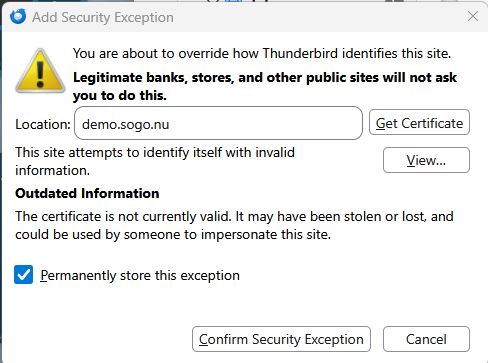
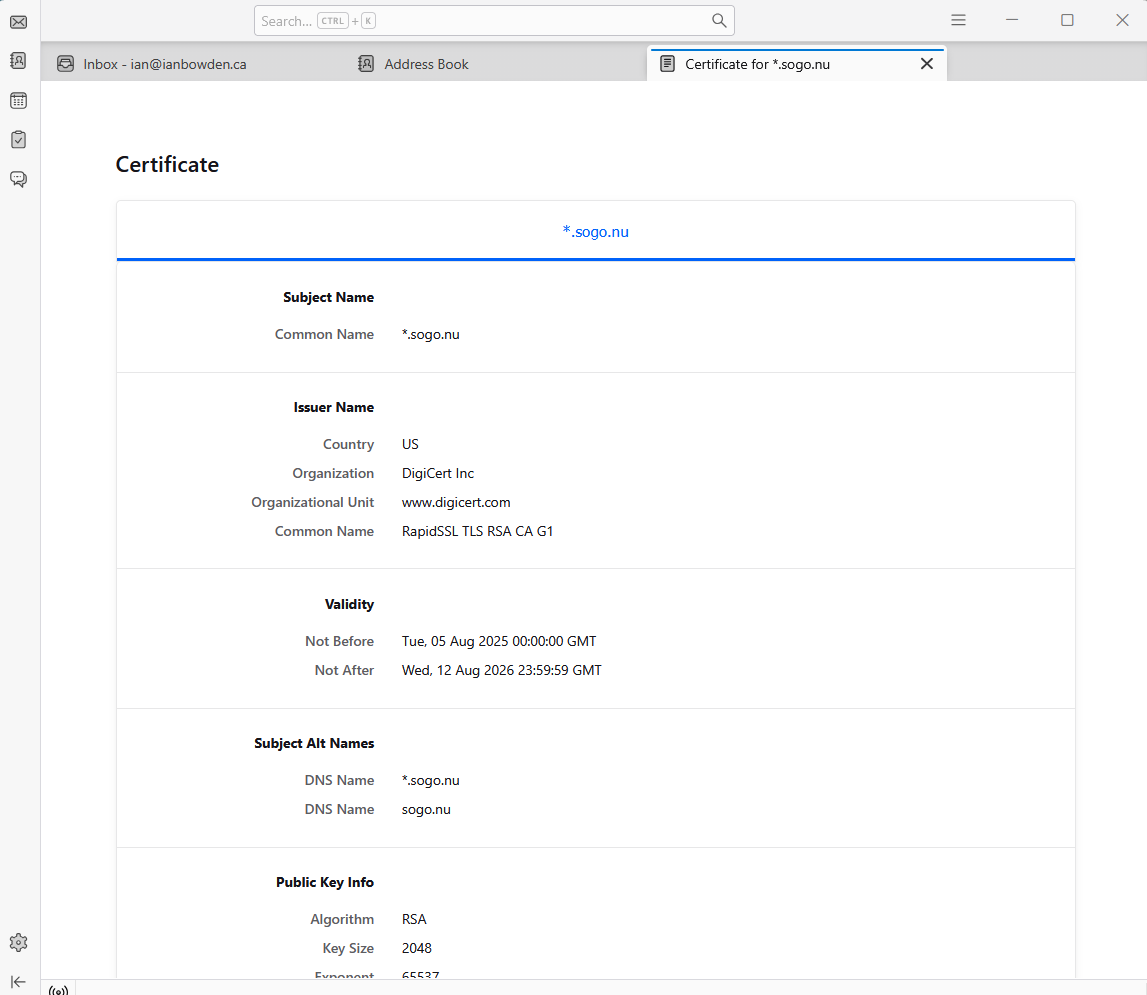
Sometime ago, when I was regularly using more than one computer, I thought I'd found a way to have my Thunderbird address book centrally located and accessible from both computers. I got no success from attempting this, but have suffered some side-effects every since. Configuring Thunderbird back then somehow involved using the location "demo.sogo.nu" and I believe it related to a security certificate. What used to happen was, soon after rebooting the computer, I'd get a couple of pop-up messages about connecting to demo.sogo.nu that I could clear away easily. Recently, something changed regarding this certificate and I now get pop-ups (screenshot attached) that continually bother me to create a security exception. I want these gone! I've gone into the Certificate Manager and can't find anything under the Server tab to delete. One other clue is a second screenshot that I discovered somewhere in Thunderbird that actually shows the *.sogo.nu certificate - but offers no way to delete it! Can anyone give me a hand? My only alternative is to literally annihilate Thunderbird and start from scratch, but I really don't want to go there.
تصاویر صفحه پیوست شده

پاسخ‌ها (1)

The cert for demo.sogu.nu has expired on August 12 2026, hence the exception prompt. Talk to your email provider, they'll have to renew their cert.

یک سؤال بپرسید

شما باید برای پاسخ به پست‌ها وارد حسابتان شوید. اگر هنوز حسابی ندارید، لطفاًً یک سؤال جدید آغاز کنید.