


Message Seperator Line

Hi,
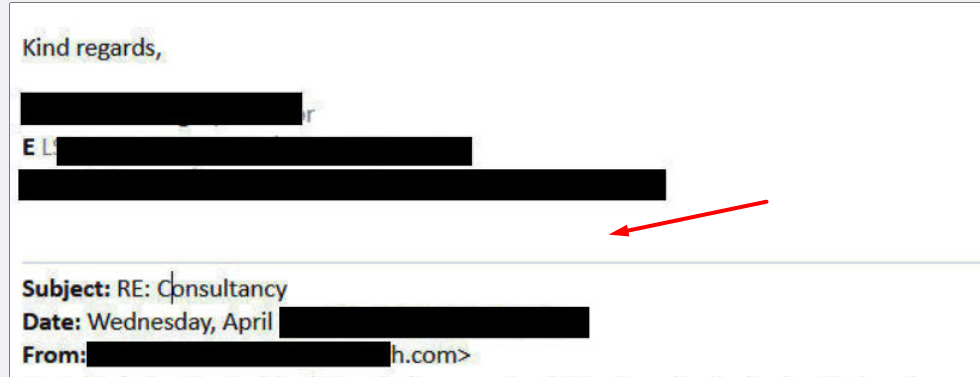
I am trying to edit my message separator line (which I added many years ago). Now there is a big gap in the line and messages. How can I reduce this gap please? Any advice?
Regards,
LS
All Replies (10)
Is the image showing you are 'replying' to an email ?
It looks very much like something I use.
It looks more professional to have the gap between your signature and the line.
The additional line maybe something you inserted in the html of the signature. Is the signature in this location: Account Settings select name of account For 'Signature Text' - did you select the checkbox 'Use HTML' and then type into the Signature text box ? OR did you select checkbox 'attach the signature from a file instead: selected a saved html - you created a signature in a Thunderbird Write window, save as html file and then select it.
Toad-Hall,
Yes, this is when I reply to or forward a message. The gap is of 2 lines, where as I need only 1 line gap. I am using the signature text as "Use HTML", but at the end of the HTML signature text, there is no line, or break. There is nothing wrong with the HTML signature text I think.
For this line, I think I used a plug a while back but it is not working or I deleted it long ago. Or maybe I edited it in troubleshooting information, edited some file. Is it possible to go back to the default message template in Thunderbird and then add a message separator line again?
Regards,
LS
Modified by lsingh
Check this preference because you may have inserted the line using it.
- Settings > General
- scroll to bottom and click on 'Config Editor' button
- It open 'Advanced Preferences' in a new tab
- in search type: ondate
- look for this line: mailnews.reply_header_ondateauthorwrote
You may see the line followed by something like this On #2 #3,#1 wrote If you see a curved arrow on far right - click on it and it will replace with default.
Then when you click on 'Reply', the line should have gone and you will be back to a single line difference between signature and the actual reply to email.
Did this work to get back to default ?
It's possible you created the following in order to achieve the line which has a break before the On #2 #3,#1 wrote
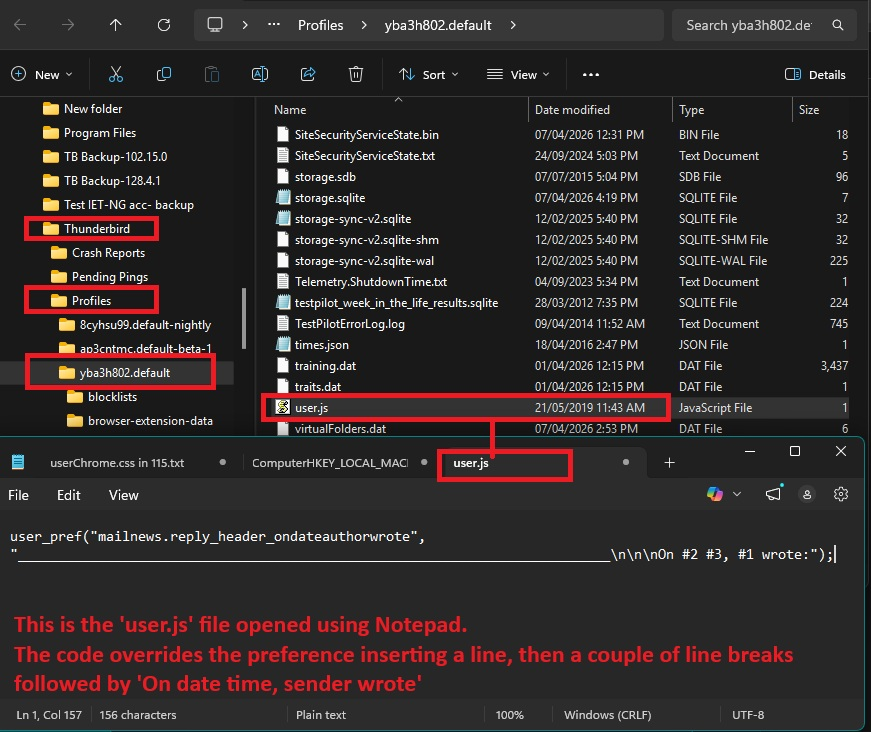
In the profile name folder, do you have a 'user.js' file ? It's possible it contains the code that overrides the preference.
You would need to Exit Thunderbird, before you access that file to edit it.
Another possibility is if you are using an addon - maybe 'ReplyWithHeader' ? https://services.addons.thunderbird.net/gu/thunderbird/addon/replywithheader/
If yes, then perhaps you used it to get the current result.
Basically, if using an underscrore _ to create the line, it can look like there are two blank lines, but in reality there is only one blank line as the second line is actually being used to display the underscore line.
If you click on 'Reply' Then move cursor down below signature, it moves one for the blank line, then move down again and it looks like a second blank line BUT if you now click on Space you will see it moves the line sideways to the right.
So, there may not be a second line, it's just a visual issue due to use of underscore to create the line.
Toad-Hall,
I clicked on the curved arrow, but the line is still there. And yes I use ReplyWithHeader plug in, but that is only for the Outlook style header.
I might have done something with the user.js file. But how can I see what modification was done to it?
lsingh said
Toad-Hall, I clicked on the curved arrow, but the line is still there. And yes I use ReplyWithHeader plug in, but that is only for the Outlook style header.
If line is still there it means something is overriding the default and it's one of two things. The obvious one is the addon - That addon does say : Provide special/meaningful email message separator line You could disable the addon and see what happens.
I might have done something with the user.js file. But how can I see what modification was done to it?
The 'user.js' file is not in profile by default. It's something you would have to create.
I have a 'user.js' file and I've got the same line as you, but use Thunderbird data to set up content. I'll add an image showing contents of that file.
I got info from here when creating it. https://kb.mozillazine.org/User.js_file https://kb.mozillazine.org/Reply_header_settings
I have carefully looked again at the image you posted. It does not show two line breaks after the signature. The second line is for the actual line itself - the line is created using underscore so it appears at the bottom of that line space.
Did you test a Reply to see if there was really only one line break and the second line is actually the line itself because it's an underscore ? click on 'Reply' for any email. Then move cursor down below signature, it moves one for the blank line, then move down again and it looks like a second blank line BUT if you now click on Space or start typing anything you will see it moves the line sideways to the right.
Modified by Toad-Hall
Toad-Hall,
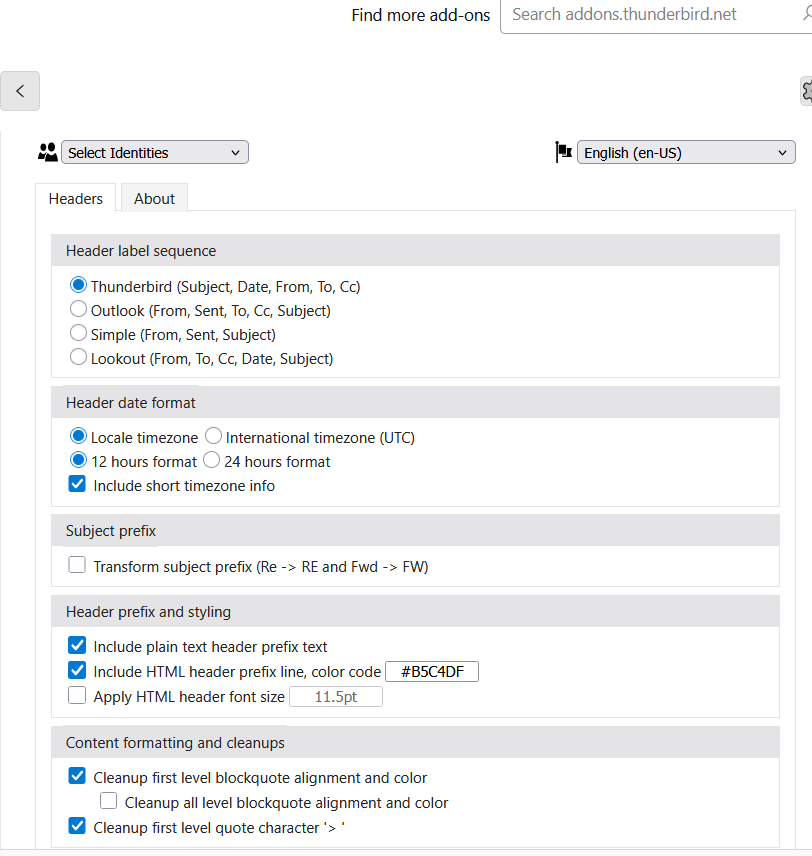
When I disable the add on, the line gets removed. But see attached, these are the options in the add-on. The option "include HTML header prefix line" adds or removes the line. But my issue is that there is too much gap between my signature and message separator line.
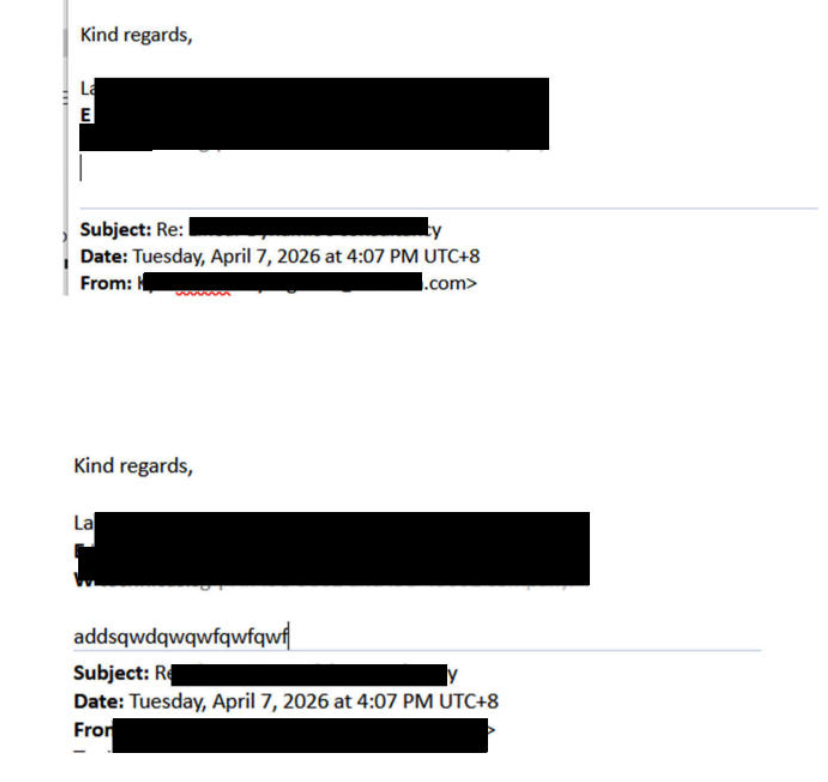
Also, I moved the cursor down with the arrow key. After pressing the arrow key the second time, the cursor goes to the second line, and when I start typing it types as shown (on top of the separator line), it does not move the separator line.
This big gap was not there. But the gap became large with some Thunderbird update a year ago.
re :When I disable the add on, the line gets removed.
That proves the addon was indeed inserting the line. If you are having a problem with something that is controlled by an addon, then you would need to contact the author of the addon to explain the issue. Only the author of the addon can fix/modify anything in an addon. Thunderbird allows authors to write addons to use in Thunderbird. It's an additional bonus as far as many are concerned. But the author has to make sure their addons are compatible and work with any updates produced by Thunderbird. They can choose to do this or decide to stop for any reason. Therefore, it's always advisable to check if an addon will continue to work if you update Thunderbird. Sometimes it's worth delaying a Thunderbird update until the addon has also been updated.
As you are able to write text on the second line, it sounds like the code is inserting the line across the top of the third line. This info may help when explaining the issue.
At the link: https://services.addons.thunderbird.net/gu/thunderbird/addon/replywithheader/
The author has provided some contact details: Home page, Support and an email address.
Thanks Toad-Hall. Without the add-on, is it possible to add a code in Thunderbird to add a message separator? How can I do that?