Search bar expansion

I would like to have my search bar in the all address book, and other address books, search for the city, state, zip code, or word that i have in the contact data. i can't put everything in the nickname space, which it will look up! Thank you
All Replies (6)
Have you considered making a suggestion in the feedback forum? The link is on the help menu in Thunderbird. This mentioning what you would like in the support forum is not working for you or anyone else as this peer forum is not monitored by the development team looking for ideas.
You have clearly identified the limitation on the address book search so you asking for change, not support.
how do i get to the feedback forum from here? Good answer, but i still assistance to get to the feedback forum from here! thank you
try the link on the Thunderbird help menu.
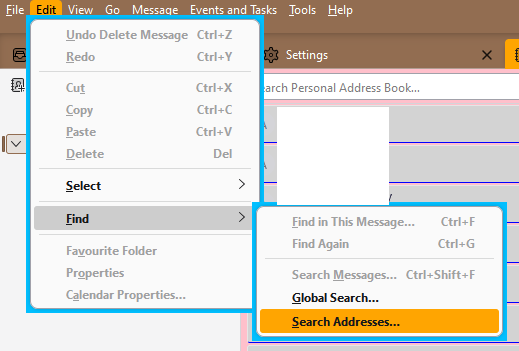
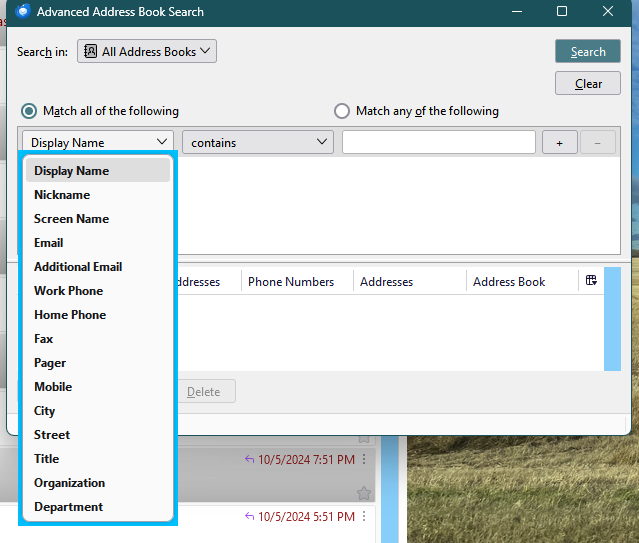
There are more fields that can be searched starting from Edit/Find/Search Addresses (see picture). Press Alt if the Menu Bar with Edit is hidden. Additional search options are available with the Cardbook add-on.
sdfhowes THANK YOU! This is great: There are more fields that can be searched starting from Edit/Find/Search Addresses (see picture). Press Alt if the Menu Bar with Edit is hidden. Additional search options are available with the Cardbook add-on. BUT, how do i find it? I did not realize that if clicked on the image it would enlarge! It looked great. I would like to add keywords in my notes area too! For example, convict. ALSO all i can see on my All Address Books search bar, actually almost just to the right of it, is "Search all address books" HOW do i get to the Advanced Address Book Search? I did press the alt key and nothing happened with search all address books bar!!!! Thank you again for your efforts!!!!!!!...b³
The Advanced Address Book Search is opened from the Edit menu (see picture), which is toggled on or off with the Alt key. This type of search doesn't search the Notes field, but the Cardbook search does search all fields.