


Windows 10 reached EOS (end of support) on October 14, 2025. If you are on Windows 10, see this article.

جست‌وجوی پشتیبانی موزیلا

از کلاهبرداری‌های پشتیبانی اجتناب کنید. ما هرگز از شما نمی‌خواهیم که با شماره تلفن تماس بگیرید یا پیامک ارسال کنید یا اطلاعات شخصی خود را هم‌رسانی کنید. لطفاً فعالیت‌های مشکوک را با استفاده از گزینه «گزارش سوءاستفاده» گزارش دهید.

مانند نخ كشيده
قفل‌شده بایگانی شده

Read request reply back

SuMo Bot

I recently starting using Thunderbird email program because my old Incredimail email program i have used for years is no more. Loved that program. Incredimail had a read request option that would send out with your email to recipient that would to let sender know that your email was read. Then i would get a reply back saying my email was read. I loved that because sometimes i needed to know if a person read my email or not and at what time.

I can not find the same thing in Thunderbird program. Am I just not finding the option or does it not exist as an option in Thunderbird?

If it does not exist as an option, how can it be added to Thunderbird or is there some kind of add-ons i can download to Thunderbird to make this work.

let me know how to do this or the steps and what to do to activate it.

I recently starting using Thunderbird email program because my old Incredimail email program i have used for years is no more. Loved that program. Incredimail had a read request option that would send out with your email to recipient that would to let sender know that your email was read. Then i would get a reply back saying my email was read. I loved that because sometimes i needed to know if a person read my email or not and at what time. I can not find the same thing in Thunderbird program. Am I just not finding the option or does it not exist as an option in Thunderbird? If it does not exist as an option, how can it be added to Thunderbird or is there some kind of add-ons i can download to Thunderbird to make this work. let me know how to do this or the steps and what to do to activate it.

پاسخ‌ها (1)

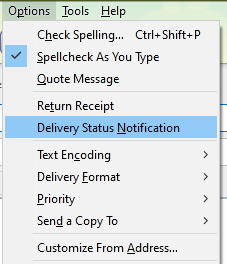
It's under Options in the Write window (see picture). Press Alt if the Menu Bar with Options is hidden.
https://support.mozilla.org/en-US/questions/1272238

This question has been locked because the original author has deleted their account. While you can no longer post new replies, the existing content remains available for reference.