


My Firefox regulary crashed without any warnings and reports.
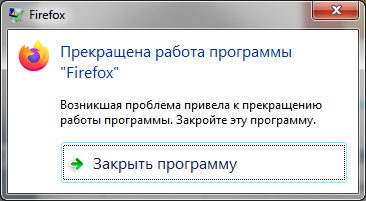
I am using Firefox quantum version 72.0.2 (64-bits), my browser frequently crashes but on page about:crashes not existed any reports. I try full uninstall Firefox (with deleting Firefox folder in Program Files and User profile. My computer is working correctly (Another browsers such Chrome, Opera, Cyberfox and even 32-bits version of Firefox Quantum are working correctly). Previous version Firefox (before Quantum) also is working correctly, but after automatic updates to Quantum problem returned. I uninstalled and reinstalled Flash Player, but this didn't help. I like Firefox and dosn't want use another browser. Help me repair it.

پاسخها (1)
Hi anbsoftware, that looks like a Windows crash dialog. Firefox -- or software that interacts with Firefox -- may be causing a memory violation that causes Windows to kill Firefox. (But I can't read the text, so I'm just guessing.)
When there is a problem with 64-bit Firefox but not 32-bit Firefox, the problem sometimes is related to old device drivers, such as Logitech camera drivers, that never got updated. But that's not the only potential reason.
You might find some useful information in the system-level Applications log. I wasn't able to find a good Microsoft article on how to use the Event Viewer but here are some third party articles from a web search that might help:
- https://www.howtogeek.com/123646/htg-explains-what-the-windows-event-viewer-is-and-how-you-can-use-it/
- https://kb.blackbaud.com/articles/Article/75433
Or you can try a web search for "event viewer" "application log" on your preferred search engine.