


Windows 10 reached EOS (end of support) on October 14, 2025. If you are on Windows 10, see this article.

جست‌وجوی پشتیبانی موزیلا

از کلاهبرداری‌های پشتیبانی اجتناب کنید. ما هرگز از شما نمی‌خواهیم که با شماره تلفن تماس بگیرید یا پیامک ارسال کنید یا اطلاعات شخصی خود را هم‌رسانی کنید. لطفاً فعالیت‌های مشکوک را با استفاده از گزینه «گزارش سوءاستفاده» گزارش دهید.

مانند نخ كشيده
بایگانی شده

Moving emails to another folder hides the target folder [linux]

CBFJ

In Thunderbird 60.0, when moving emails, a "thumbnail" of the email lines is showing, which will hide the highlighting of the destination folder.

In older version, I could easily move several emails from one folder to another and see the highlighting of the destination folder.

How can I change this back to the previous way?

When only moving one email, this is not a big issue (still a little one), but when moving several, it is, as I cannot know for sure at which folder I'm pointing. (Screenshot attached)

I've found that, if I drag in the left side of the lines, or at the top or bottom line, I can avoid hiding the destination folder, but this is not a very convenient way of organising my emails.
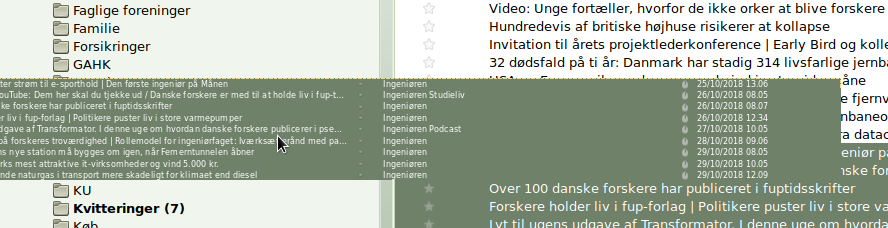
In Thunderbird 60.0, when moving emails, a "thumbnail" of the email lines is showing, which will hide the highlighting of the destination folder. In older version, I could easily move several emails from one folder to another and see the highlighting of the destination folder. How can I change this back to the previous way? When only moving one email, this is not a big issue (still a little one), but when moving several, it is, as I cannot know for sure at which folder I'm pointing. (Screenshot attached) I've found that, if I drag in the left side of the lines, or at the top or bottom line, I can avoid hiding the destination folder, but this is not a very convenient way of organising my emails.
تصاویر صفحه پیوست شده

ویرایش شده توسط Wayne Mery

پاسخ‌ها (1)

Yes, this helps. Thank you.