

Windows 10 reached EOS (end of support) on October 14, 2025. If you are on Windows 10, see this article.

جست‌وجوی پشتیبانی موزیلا

از کلاهبرداری‌های پشتیبانی اجتناب کنید. ما هرگز از شما نمی‌خواهیم که با شماره تلفن تماس بگیرید یا پیامک ارسال کنید یا اطلاعات شخصی خود را هم‌رسانی کنید. لطفاً فعالیت‌های مشکوک را با استفاده از گزینه «گزارش سوءاستفاده» گزارش دهید.

مانند نخ كشيده
حل شده بایگانی شده

How do I put text into a new "draft"?

Pirate007

Newbie here. Exactly how to I drop text into a new (my first) draft? I created a sub-folder under drafts.. (see attached) and now that the folder is open.. how do I put text into it? I copied the text I needed from another program.. tried to copy it there and .. nothing.. I see no options...

When I right click I get no paste option.. when I click on "edit" in the top tool bar I get no option... When I click into the message field I get no cursor... What am I missing?
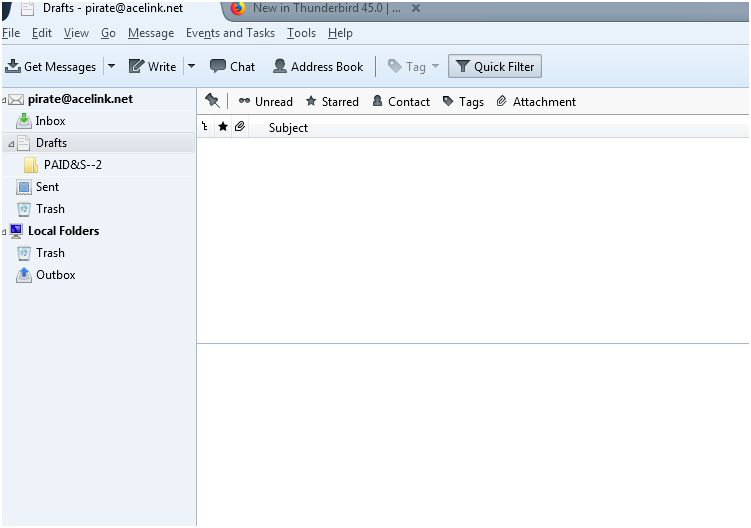
Newbie here. Exactly how to I drop text into a new (my first) draft? I created a sub-folder under drafts.. (see attached) and now that the folder is open.. how do I put text into it? I copied the text I needed from another program.. tried to copy it there and .. nothing.. I see no options... When I right click I get no paste option.. when I click on "edit" in the top tool bar I get no option... When I click into the message field I get no cursor... What am I missing?
تصاویر صفحه پیوست شده

پاسخ‌ها (2)

بخش‌ها

You double click the draft message to open it in a composition (Write) window. You cannot edit messages in the draft folder. Then either send it or save it as a draft again.

Thank you.. Got it.. Didn't realize the draft had to be an email .. I thought I could just type in their like a new word document then save as a draft...