

این رشته بایگانی شد.
اگر به کمک نیاز دارید لطفاًً یک سؤال بپرسید.

حل شده
بایگانی شده
I'm unable to SEE successfully transferred contact details in address book

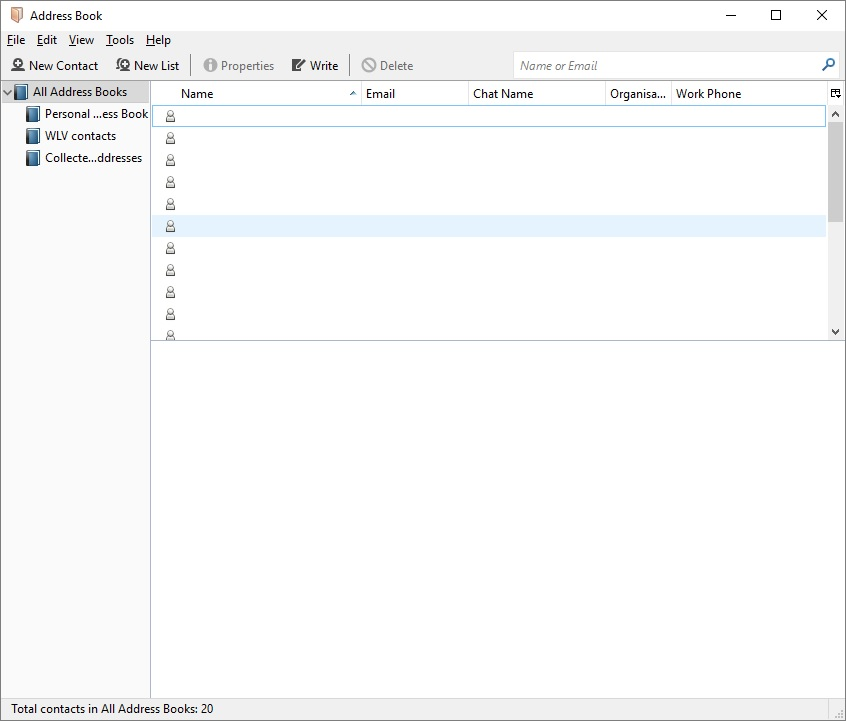
I've transferred contact name/email address from windows live mail using a csv file and the Thunderbird data transfer add on. However when I click on Address book, I only get a little human key symbol in Thunderbird and cannot see the name/email address details. When I double-click on the symbol, all the email details for that individual are shown. So data has been transferred BUT I'm unable to see the individual details in the address book list.
I've transferred contact name/email address from windows live mail using a csv file and the Thunderbird data transfer add on. However when I click on Address book, I only get a little human key symbol in Thunderbird and cannot see the name/email address details. When I double-click on the symbol, all the email details for that individual are shown. So data has been transferred BUT I'm unable to see the individual details in the address book list.
پاسخها (1)
بخشها
Open a Contact by double-clicking it and check if all the imported data is in the appropriate fields. You may find that the email address has landed in the last name field, or similar.