


OAuth2 pop-up says unable to connect

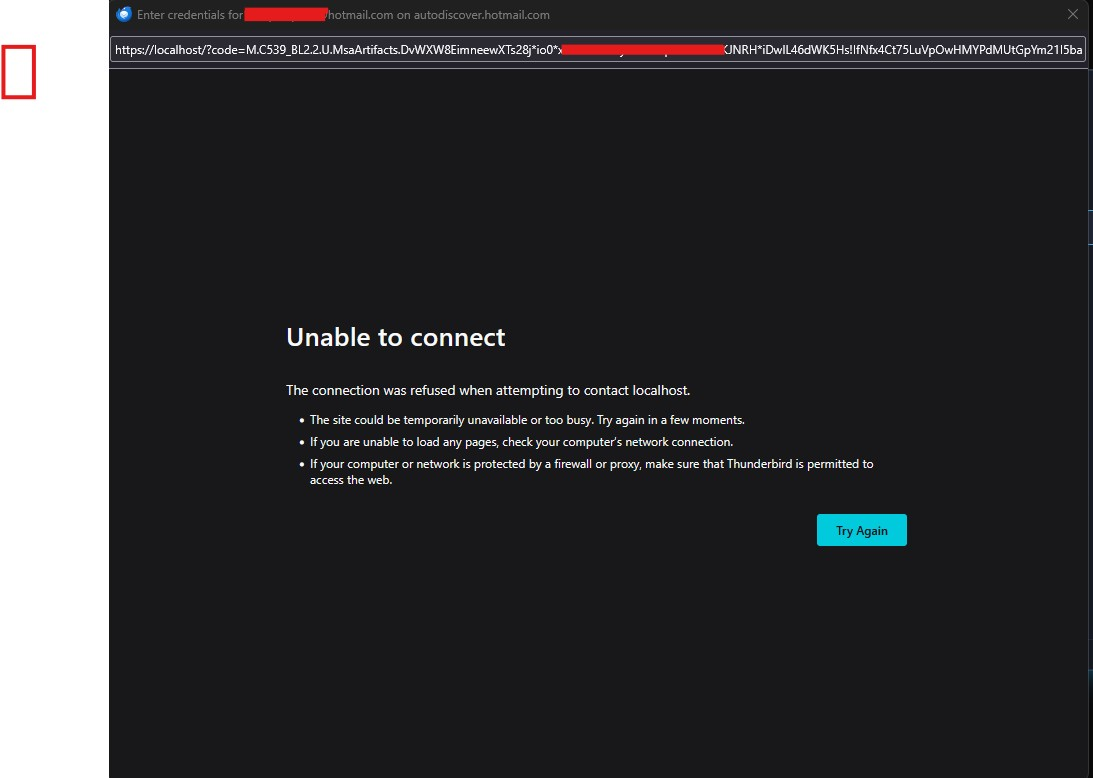
I have been having troubles logging in with my Microsoft email account on Thunderbird (hotmail). When I fill in the name and email address, a pop-up appears with the OAuth2 authentication but the only thing that ever appears in this pop is the message "Unable to connect" with some additional possible explanations.
I have looked online a lot for solution but nothing seems to work. I have cleared the cache, removed all mentions of the email account (it was working before until I added a passkey to the account).
Other reasons I have seen is that the request might be intercepted by certain problems like Apache or Nginx etc. I am running an instance of Nginx on my home server, which is a different device. But I have temporarily turned it completely off but it did not change the situation. The same story with and instance of PiHole, it turns on my homeserver which is a different device and also had to turned off.
The machine I am running Thunderbird on is a Windows machine. I have also tried booting into safe mode with networking but also that did not do anything.
I have tried copying the url on the top of the pop-up window and pasted into several web-browsers. There is does load and I can select the correct passkey to login. But the data that comes back from it is not being given to Thunderbird of course so it does nothing. But the fact that it is able to load outside of Thunderbird makes me think it is a problem on the side of Thunderbird.
Could you perhaps help me set up my email on Thunderbird?
All Replies (2)

Thunderbird does not (yet) support passkeys. If you also removed the password for your Microsoft account, then this may be the problem. I'd expect Microsoft offering an alternative way for authenticating devices without passkey support, but I haven't looked into this.
Valitud lahendus
I didn't know passkeys were not supported yet. I had not removed my other ways of logging into my Microsoft account so I tried removing the passkey from the login methods. After that I tried it again on Thunderbird and now actually the pop-up contained a proper login page. I logged successfully with my password. Still, I would have liked to still be able to login with a passkey if I use the browser. So I reconfigured a passkey again on my Microsoft account. To test if it would still work on Thunderbird, I removed the Microsoft email account on Thunderbird to just add it again. It still worked but I am not really sure why since it is pretty much the same situation as I had before. But oh well! It works now and I hope it keeps working! Thank you very much for your reply, Christ1!