


Thunderbird is loaded on my Dell laptop (Win 11) twice. How do I delete one and save my messages?

There are two copies of Thunderbird on my laptop. Win 11. A newer copy appeared but does not have my old emails that I have saved. How do I safely get rid of it and keep all emails? Thank you.
All Replies (3)

I will guess that you have accidentally installed two copies to different locations, maybe one of them came from the Microsoft Store and the other from Thunderbird.net. Do you have icons for both installations? If so, right-click on each and compare the Properties of one that works the way you like with the one you don't. The properties dialog will look something like the below. What do each say in the "Target" field?
You can also look in the list of in Apps & Features for "Mozilla Thunderbird" to see if it's listed twice. But before you uninstall, please report back here with your findings and we will advise you further.
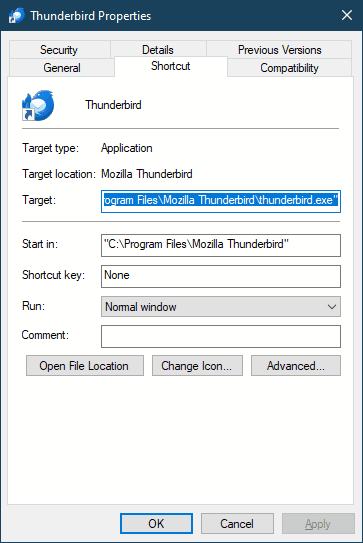
Can you execute each individually? Is there a desktop icon for each? Are you able to locate where each copy resides? Usually, you can rightclick on desktop icon to see location. Do you know the version of each? Do you see two copies, or is some screen implying there are two copies (some uninstaller programs indicate that incorrectly). Please respond. I have a suggested approach, but would appreciate your response first. thank you
NOTE I just saw Lin has also responded. I will stand aside to avoid confusion.
Muudetud david poolt
david said
Can you execute each individually? Is there a desktop icon for each? Are you able to locate where each copy resides? Usually, you can rightclick on desktop icon to see location. Do you know the version of each? Do you see two copies, or is some screen implying there are two copies (some uninstaller programs indicate that incorrectly). Please respond. I have a suggested approach, but would appreciate your response first. thank you NOTE I just saw Lin has also responded. I will stand aside to avoid confusion.
Please continue, david. An emergency came up and I may not be able to respond until tomorrow.