


With TB 148+, authentication loop with an EWS account

Thunderbird 148+ on Windows 11 repeatedly prompts for the password when synchronizing an Exchange account (professional) configured with the native Exchange support (no add-on installed).
The account only offers “NTLM” or “Normal password” authentication methods. OAuth2 is not available in the account settings.
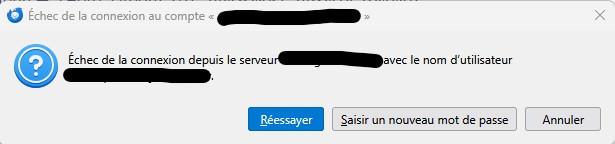
During synchronization, Thunderbird asks for the password separately for many folders. However, clicking “Retry” usually works immediately without changing the password, and manually re-entering the same password also works.
The issue then reappears for the next folder, causing continuous authentication prompts (I have many folders...).
Actions already tested:
- deleting saved passwords and tokens,
- deleting/renaming key4.db and logins.json,
- restarting Thunderbird,
- recreating the account.
The problem persists.
This looks like an authentication/session handling issue rather than an actual invalid password.
All Replies (4)

Thunderbird 148+ on Windows 11
Why don't you use the latest Release version of Thunderbird? https://www.thunderbird.net/thunderbird/all/
The account only offers “NTLM” or “Normal password” authentication methods. OAuth2 is not available in the account settings.
See https://support.mozilla.org/kb/thunderbird-and-exchange for setup instructions.
I currently use TB 151, but the problem started with 148 and then went on with all versions. Thanks for the link, I'll have a look at it.
The link corresponds to the general information on Exchange and TB, and that was of course my first reading before using TB and Exchange :) No idea why it looks like TB ask for password for every folder ?
Please post your Troubleshooting Information. At the top right of the Thunderbird window, click the menu button ≡, then select Help > Troubleshooting Information. Press the "Copy text to clipboard button" and paste the information into your reply.