


In Thunderbird on my Mac there appears to be no way of restoring alphabetical order to Folders

In Thunderbird on my Mac there appears to be no way of restoring alphabetical order to Folders.
All of my folders under A(and there are a lot of them) have dropped down a few alphabetical letters. There is supposed to be a right click on account name and restore this order, however, like many features on Thunderbird it does not exist now.
So a) why has Thunderbird on my Mac done this and how do I sort it out please?
All Replies (7)
Hughmoz said
So a) why has Thunderbird on my Mac done this and how do I sort it out please?
It depends on which version of Thunderbird you are using. The option is built-in in the actual release version but not yet in esr versions. If you are running Thunderbird 140.11.0esr version the "Reset Folder Order" is not yet available. It will be in the next major update of the esr version.
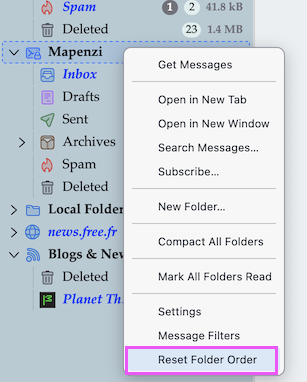
Ah! Having moved a lot of folders manually yesterday, today they have all gone back to the wrong place.
I have never had this issue before in many years of using Thunderbird and the fact that there is not a "Reset Folder Order" is not helpful.
Can I go back to an earlier version to get his sorted until Thunderbird has this option included?
You didn't mention which Thunderbird version you are using actually. In the menu bar click on Thunderbird > About Thunderbird ...
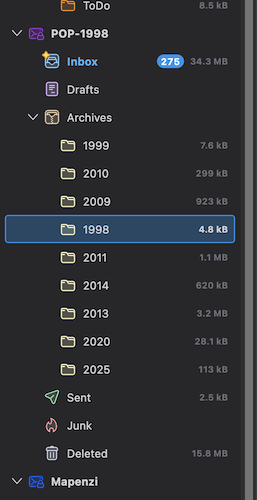
Besides v151 I'm also running v140.11.0esr in its proper profile. I just made a test by moving my 1998 subfolder somewhere amongst the other subfolders in my Archive folder (see image). The 1998 folder stays in its new place even after restart and doesn't move back to its initial place above 1999. Then I quit Thunderbird, removed the folderCache.json file from the profile folder and restarted Thunderbird: this time all subfolders in Archives were back in alphanumeric order.
If you want to test removing the folderCache.json file from your profile folder go to Help > Troubleshooting Information > Profile Folder > Show in Finder... then quit Thunderbird. Remove the file, restart Thunderbird which automatically will create a new folderCache.json file.
Have tried your suggestion twice, but no change in alphabetical order at all.
I tried manually moving all of the A Folders manually, however, they all retunrned to wrong place as soon as quit and reopened.